New in 0.15: rayito setup and agent deploys to Amazon Bedrock AgentCore Runtime, with AWS CDK too
Sandboxes for AI agents, in your own AWS account
Every sandbox is a hardware-isolated AWS Lambda MicroVM. The SDK calls the AWS API directly with your credentials: no Rayito server or API key, and the same API as E2B.
Coming from E2B? Change one import. Free and Apache-2.0: you only pay AWS.
Needs the rayito-base image in your account: Set up AWS, once.
resume()
0.77 spool.take()
2.3 sready for commands
5.2 skernel ready
Medians measured on real AWS (us-east-1, 2026-09). Details in Timings.
Why Rayito
A sandbox in seconds
Sandbox.create() leaves the sandbox ready for commands in about 2.3 s and
the Python kernel in about 5.2 s. From a pool of suspended sandboxes, in
under a second.
A coding agent inside
sbx.agent.run() runs OpenCode or deepagents in the sandbox itself. The
model (Bedrock, Anthropic, OpenAI and more providers) is
called through the secret gateway: the agent uses the credential but cannot
read it.
From E2B in one import
What Lambda MicroVMs cannot do raises UnimplementedError: nothing is
approximated silently.
How it works
Your code asks for a sandbox; AWS Lambda starts it in your account and hands back the result.
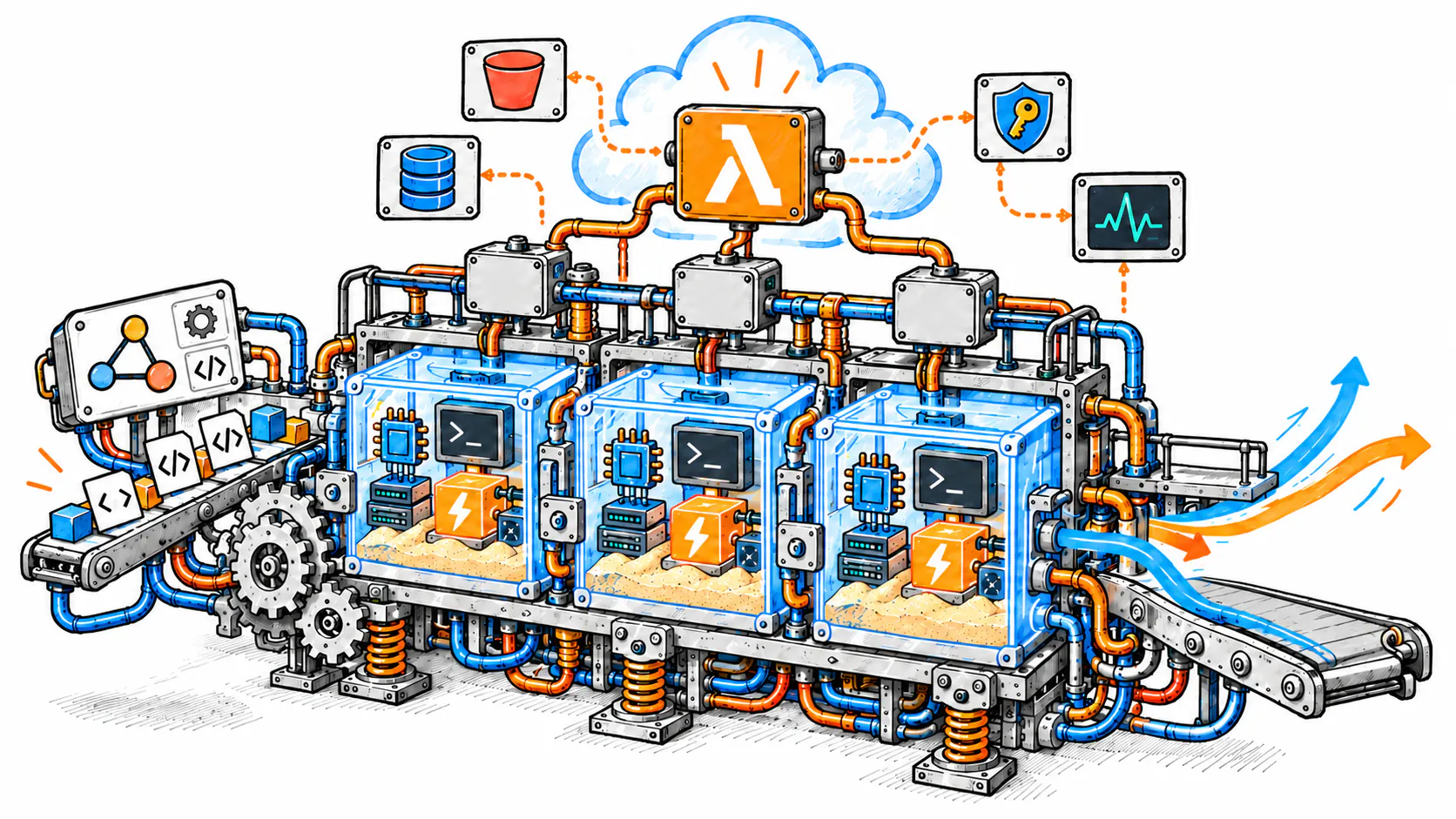











- Your agent or your code calls the SDK with your AWS credentials.
- Every sandbox starts in its own hardware-isolated Lambda MicroVM.
- Outputs, files and artifacts come back to your code; nothing goes through a Rayito server.
Start in three steps
Install the SDK
Python ≥ 3.11 or Node ≥ 20. The CLI (rayito setup, rayito doctor) comes
with rayito[cli] in Python and inside the npm package (npx rayito).
Prepare your account, once
One command, rayito setup, prepares the account and region: IAM stack,
rayito-base image and the artifacts bucket (it reuses the one you already
have and, if there is none, creates it). It shows the plan and the cost and
asks for confirmation. The first run takes about 10–12 minutes, almost all of it
the image snapshot on AWS, once per account and region; later runs, seconds.
rayito doctor is the check.
Launch your first sandbox
Save the code from the top in first.py (or first.ts) and run it.
Agents
A coding agent inside the sandbox
A single Sandbox.create() on the rayito-agent image is enough. With
allow_internet_access=False the sandbox only reaches the model, through the
secret gateway. The agent is OpenCode
or deepagents, and the provider is whichever you prefer (see
Agent providers).
Agent templates · Fast start? Which one to use · VM versus tokens
from rayito import AgentModel, AgentSpec, Sandbox, SecretStore, bedrock_gateway

MODEL_ID = "us.anthropic.claude-haiku-4-5-20251001-v1:0"
SecretStore().create("bedrock-key", "Bearer <short-lived Bedrock key>")
spec = AgentSpec(model=AgentModel(provider="bedrock", id=MODEL_ID, gateway="bedrock", region="us-east-1"))

with Sandbox.create(
    template="rayito-agent",
    allow_internet_access=False,
    gateways={"bedrock": bedrock_gateway("bedrock-key", region="us-east-1", models=[MODEL_ID])},
) as sbx:
    result = sbx.agent.run("List the files in /home/user and summarize what is there.", spec=spec)
    print(result.text, result.usage.total)
import { AgentModel, AgentSpec, Sandbox, SecretStore, bedrockGateway } from "rayito";

const MODEL_ID = "us.anthropic.claude-haiku-4-5-20251001-v1:0";
await new SecretStore().create("bedrock-key", "Bearer <short-lived Bedrock key>");
const spec = new AgentSpec({
  model: new AgentModel({ provider: "bedrock", id: MODEL_ID, gateway: "bedrock", region: "us-east-1" }),
});

await using sbx = await Sandbox.create({
  template: "rayito-agent",
  allowInternetAccess: false,
  gateways: { bedrock: bedrockGateway("bedrock-key", { region: "us-east-1", models: [MODEL_ID] }) },
});
const result = await sbx.agent.run("List the files in /home/user and summarize what is there.", { spec });
console.log(result.text, result.usage.total);
Deploy
Deploy your agent in one command
Install the SDK and run rayito agent deploy ./my-agent (or deploy_agent /
deployAgent). The SDK detects the framework, the entrypoint and the protocol
by reading your files, without running your code.
Pick where it runs. On a fleet of Lambda MicroVMs (the default), the model is called through the secret gateway, so the agent never sees the credential, and you tune what matters: memory, concurrent sessions, queue, MicroVM pool, environment variables and internet egress.
Or on Amazon Bedrock AgentCore Runtime with --target agentcore, built in
AWS with CodeBuild, no local Docker. AgentCore has no secret gateway: the
agent uses the runtime role, with least privilege (see
Security on AgentCore).
If your team uses infrastructure as code, the RayitoAgent AWS CDK
construct deploys the same thing with cdk deploy.
- LangGraph and LangGraph.js
- LangChain
- Deep Agents
- Strands and Strands harness
- Hermes
- OpenCode
- Vercel AI SDK
- Your own HTTP app
import { deployAgent } from "rayito";

const fleet = await deployAgent("./my-agent", { options: { bucket: "amzn-s3-demo-bucket" } });
try {
  console.log((await fleet.invoke("Summarize the README.")).text);
} finally {
  await fleet.stop();
}
// on AgentCore: await deployAgent("./my-agent", { target: "agentcore" });
import { App, Stack } from "aws-cdk-lib";
import { RayitoAgent } from "rayito/cdk";

const stack = new Stack(new App(), "Agents");
// same resources and IAM as --target agentcore
new RayitoAgent(stack, "SupportBot", { project: "./my-agent", name: "support-bot" });
// in Python: from rayito.cdk import RayitoAgent (rayito[cdk] extra)
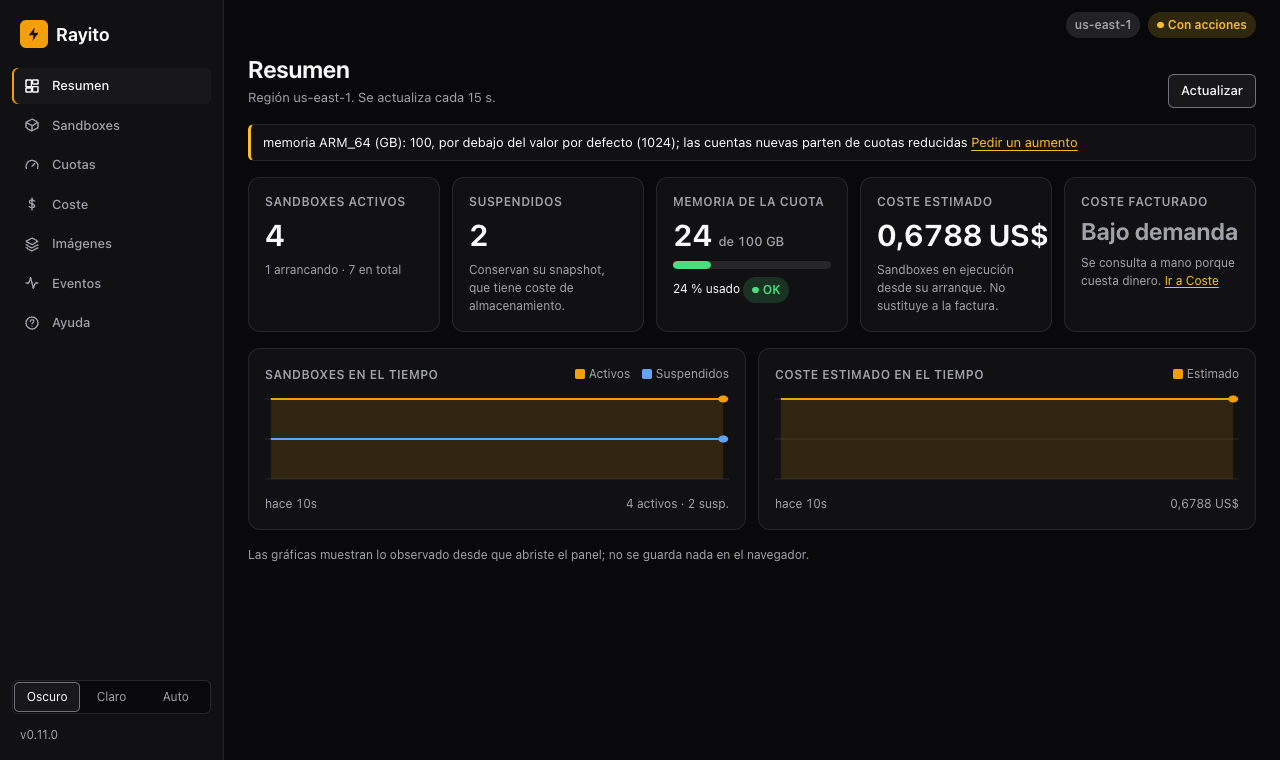
A dashboard to see and operate your sandboxes
rayito dashboard opens in your browser a local dashboard with your
account's sandboxes, quotas, cost and images. It is read-only unless you
pass --allow-actions, and there is no third-party server.
Step-by-step tour ·
Deploy it in your account
What is included
Freeze the sandbox with its state and come back in 0.38 s.
Suspended sandboxes ready in under a second.
HOME on S3, beyond the 8 h.
Cut or filter outbound internet access.
A sandbox for your editor or assistant over MCP.
Rayito as a tool for your agent.
Your own images with E2B's Template DSL.
Sandbox metrics over OTLP to CloudWatch.
From your folder to a MicroVM fleet in one command.
Your agent on Amazon Bedrock AgentCore, no local Docker.
RayitoAgent and RayitoMicrovmImage in your CDK app.
Your account and region ready in one command.
Migrate from E2B in minutes
rayito.e2b and rayito/e2b accept code written for E2B 2.x. Change the
import, prepare your account and run.
- Same classes and methods:
Sandbox,commands,files,run_code. - What does not exist in Lambda MicroVMs raises
UnimplementedErrorwith a link to the explanation. - The parity table says it row by row.
Your account, your bill
Sandboxes run in your AWS account and are paid on your AWS bill. There is
no Rayito server, subscription or API key. Features with a cost of their own
are off until you pass their option, and rayito stack deploy shows you the
cost before asking for confirmation.
≈ $0.126/ha 2 GB sandbox while it runs
≈ $0.022ten minutes, including the launch
≈ $0.60/monthone suspended pool slot
$0what Rayito charges
us-east-1, list prices queried on 2026-10-06. Pricing · Optional features and their cost
Explore the manual
-
Install the SDK, set up your AWS account and launch your first sandbox.
-
One page per feature: commands, code, files, network, pause, pool and persistence.
-
The agent inside the sandbox, the MCP server, the LangChain and Vercel AI integrations and deploying your agent to a MicroVM fleet or to AgentCore, also with AWS CDK.
-
What each one enables, what it costs and how to turn it off.
-
What changes, what does not and what does not exist in Lambda MicroVMs.
-
Python and TypeScript API, CLI, errors, environment variables and limits.
-
Images, IAM, security, pricing and troubleshooting.
-
What each version brings and how to upgrade.
What is included: every surface
| Surface | What it does | Guide |
|---|---|---|
Sandbox.create / connect / kill / list / get_info |
MicroVM lifecycle, metadata and deadlines | Lifecycle |
pause() / resume(), IdlePolicy |
suspend and resume with all the state alive | Pause and resume |
timeout, max_lifetime, on_timeout, set_timeout() |
a deadline that rayd enforces even if your process dies |
Server-side deadline |
sbx.commands |
foreground and background processes, stdin, kill, reconnection |
Commands |
sbx.run_code |
stateful Jupyter kernel, results, logs, errors and plots | Run code |
run_code(language="bash" / "javascript" / "typescript") |
bash and Deno kernels in rayito-base-poly |
Languages and kernels |
sbx.pty |
real terminals with resize and reconnection |
Terminal (PTY) |
sbx.files |
read, write, list and watch; large files and S3 presigned URLs | Files and S3 |
sbx.get_host(port) |
HTTP access to a sandbox port | Ports and host |
network=, allow_internet_access=False |
E2B's outbound internet policy on rayito-base-caps |
Outbound network |
SandboxPool |
sandboxes in under a second from a pool of suspended ones | Pool |
persist=, reincarnate() |
HOME on S3, beyond the 8 h |
Persistence |
get_metrics_history(), Sandbox.paginate() |
metrics history and resumable listing | Metrics and listing |
sbx.git |
E2B's git API | Git |
sbx.agent |
a coding agent (OpenCode or deepagents) inside the sandbox, with the model behind the secret gateway | Agent in the sandbox |
rayito.e2b, rayito/e2b |
the E2B 2.x SDK by changing only the import | Migrate from E2B |
rayito-mcp |
a sandbox for Claude Code, Cursor or VS Code over MCP | MCP server |
| LangChain, Vercel AI SDK | Rayito as a tool for an agent that runs outside the sandbox | LangChain and Vercel AI |
rayito setup |
prepare the account and region in one command: IAM stack, rayito-base image and artifacts bucket |
Set up AWS |
rayito (CLI) |
publish the image, diagnose the account, operate sandboxes and stacks | CLI |
make local-up, make local-e2e |
test the SDKs against a real rayd and an emulated AWS, without an account |
Test locally |
Optional features, all off by default until you pass their option (or, for the CLI-only ones, run their command):
| Surface | What it does | Guide |
|---|---|---|
secrets=, SecretStore |
AWS Secrets Manager secrets as environment variables | Secrets |
gateways=, SecretGateway |
use a secret from the sandbox without being able to read it | Secret gateway |
mounts=, S3Mount |
an S3 bucket as a sandbox folder | S3 mounts |
size= |
sandboxes from 512 MiB to 8 GiB from per-size images | Sizes |
events=, LifecycleEvents |
lifecycle events and webhooks with E2B's signature | Events and webhooks |
telemetry=, TelemetryExport |
sandbox metrics over OTLP to CloudWatch | OTLP export |
tracer_provider= |
SDK-side OpenTelemetry spans | OpenTelemetry |
index=DynamoDbIndex(...) |
filter paused sandboxes by metadata too | Metadata index |
Template.build() |
images from E2B's Template DSL |
Templates |
AgentTemplate, rayito agent template build |
the rayito-agent image with OpenCode, ripgrep and deepagents |
Agent templates |
PoolConfig(warmup=agent_pool_warmup(...)) |
pool slots with the agent already warmed (fast start, optional) | Pool |
OptionalStacks, rayito stack |
deploy, query and delete each feature's infrastructure | Optional stacks |
rayito sandbox proxy |
a sandbox port at http://127.0.0.1 on your machine |
Local proxy |
volumes=, VolumeStore, EfsVolumes (experimental) |
an EFS file system shared live between sandboxes, in your VPC | EFS volumes |
domain=, CustomDomain, rayito domain (experimental) |
an HTTPS URL under your domain for a sandbox port | Custom domain |
rayito dashboard |
a local dashboard with sandboxes, quotas, cost and images; read-only unless --allow-actions |
Management dashboard |
deploy_agent / deployAgent, rayito agent deploy |
the agent you already have, detected without touching its code, as an HTTP service on MicroVMs | Deploy your agent |
AgentFleet, ScalingOptions |
a MicroVM fleet with several sessions, a queue and warm slots | Several sessions and several VMs |
deploy_agent(target="agentcore"), AgentCoreFleet, rayito agent list / delete --target agentcore |
the agent on Amazon Bedrock AgentCore Runtime, with no local Docker and a least-privilege role | Deploy to AgentCore |
RayitoAgent, RayitoMicrovmImage (rayito[cdk], rayito/cdk) |
the AgentCore agent and the MicroVMs image as constructs in your AWS CDK app | Deploy with CDK |
Everything works the same in Python (sync and asyncio) and in
TypeScript, with snake_case and seconds in Python and camelCase and
milliseconds in TypeScript. The cost and limits
numbers are measured against real AWS, never against a simulator.
Your first sandbox, in three steps
Apache-2.0 · no Rayito server · your account, your bill