Management dashboard in your account: the dashboard stack¶
The same page and the same /api/v1 API as
rayito dashboard, but deployed in
your AWS account as an OptionalStack (ADR-026, phase 2): a
fixed HTTPS address your team signs in to with a username and password,
without having anything open on any laptop. Rayito operates no server: everything
that is created is yours and rayito stack destroy dashboard deletes it.
Cost and activation
- Default: off. Nothing is created until you run
rayito stack deploy dashboard(orOptionalStacks().deploy("dashboard")). Once deployed, it is read-only and without billed-cost queries. - Turns on:
rayito stack deploy dashboard --artifact-bucket <bucket>.--param AllowActions=truealso creates the actions role,--param EnableCostExplorer=trueallows the billed cost and--param AuthMode=aws-iamputs the API behind a Function URL that requires a SigV4 signature (AWS_IAMvariant). - Resources and AWS calls: a Lambda function with its Function URL and its
log group; a Cognito user pool with its client and its Hosted UI
domain (and, with actions, a group); two on-demand DynamoDB tables
(audit and cost cache); a read role and, with actions, an actions
role; with
ThemeJson, an SSM parameter. WithAuthMode=aws-iam, in addition, a second function with its URL (the page), a Cognito identity pool, two roles and an SSM parameter. It does not create CloudFront distributions or S3 buckets. - Approximate cost: ~$0 at rest: with no traffic there are no invocations, and Lambda, on-demand DynamoDB and Cognito only bill for use (active users fit in Cognito's free tier). By use:
- Lambda: one invocation per page request, which polls every
15 s with the tab open. A tab
open 8 h a day for
30 days is about 57,600
invocations a month, within the 1000000
free requests and 400000 free GB-s a
month; past the free tier, $0.20 per million requests plus
duration. The Function URL is public (
AuthType NONE): unauthenticated traffic also bills invocations, so setReservedConcurrencyto bound it. AuthMode=aws-iam: the API is only invoked by whoever signs with the identity pool's credentials: an unsigned request is rejected by the Function URL without running the function. The page is still public (AuthType NONE) and bills like the Lambda above. Cognito identity pools do not bill by themselves.- DynamoDB: one write per sandbox and action (audit).
- Cost Explorer (only with
EnableCostExplorer=true): $0.01 per query, one every 24 h per window thanks to the cache and, in total for all users, at most 20 per UTC day: in the worst case $0.20 a day, about $6.00 a month. - SSM Parameter Store (only if you put the theme or the logo in
Advancedparameters, as in Your color palette): $0.05 per parameter per month plus $0.05 per 10,000 API interactions, even if there is no traffic; the function rereads them every 300 s per active container, up to about 17,280 interactions a month (≈ $0.09).
Pricing: Lambda,
DynamoDB,
Cognito,
SSM and
Cost Explorer;
checked on 2026-10-13, us-east-1.
- IAM: whoever deploys needs CAPABILITY_IAM (the template creates
roles) plus what Optional stacks requires. The function's
read role: lambda:ListMicrovms, ListMicrovmImages,
ListMicrovmImageVersions, GetMicrovmImageVersion,
servicequotas:ListServiceQuotas and little else; see Stack IAM.
- How to turn it off: rayito stack destroy dashboard. It deletes everything it
created, including the audit rows and the Cognito users
(export them first if you need them).
- Example: the one in the next section.
When to use it¶
- Yes: several people need to see (and, some of them, act on) the account's sandboxes without installing the CLI; you want a record of who killed or suspended what.
- No: if you use it alone,
rayito dashboardon your laptop costs nothing and deploys nothing. If your organization forbids public Function URLs, this stack is not for you (see Variants).
Deploy it¶
You need an S3 bucket to upload the function's code to, just like the events stack.
from rayito import OptionalStacks

stacks = OptionalStacks()  # does not call AWS
status = stacks.deploy(
    "dashboard",
    artifact_bucket="my-bucket",
    parameters={"AllowActions": "true", "InitialUserEmail": "me@example.com"},
    tags={"Owner": "my-team"},  # the tags your organization requires when creating resources
)
print(status.outputs["DashboardUrl"])
import { OptionalStacks } from "rayito";

const stacks = new OptionalStacks();
const status = await stacks.deploy("dashboard", {
  artifactBucket: "my-bucket",
  parameters: { AllowActions: "true", InitialUserEmail: "me@example.com" },
  tags: { Owner: "my-team" },
});
console.log(status.outputs.DashboardUrl);
The DashboardUrl output is the dashboard's address. With InitialUserEmail,
Cognito sends an invitation with a temporary password; without it, you create the
users yourself (nobody can sign up on their own):
aws cognito-idp admin-create-user --user-pool-id <UserPoolId> --username me@example.com
# with actions, to give it permission to kill, suspend and resume:
aws cognito-idp admin-add-user-to-group --user-pool-id <UserPoolId> \
  --username me@example.com --group-name rayito-dashboard-actions
Redeploying does not undo your configuration: parameters you do not repeat
keep their value (see Optional stacks),
so deploying again without AllowActions=true does not remove the actions or
ask for Cost Explorer again.
Step-by-step walkthrough¶
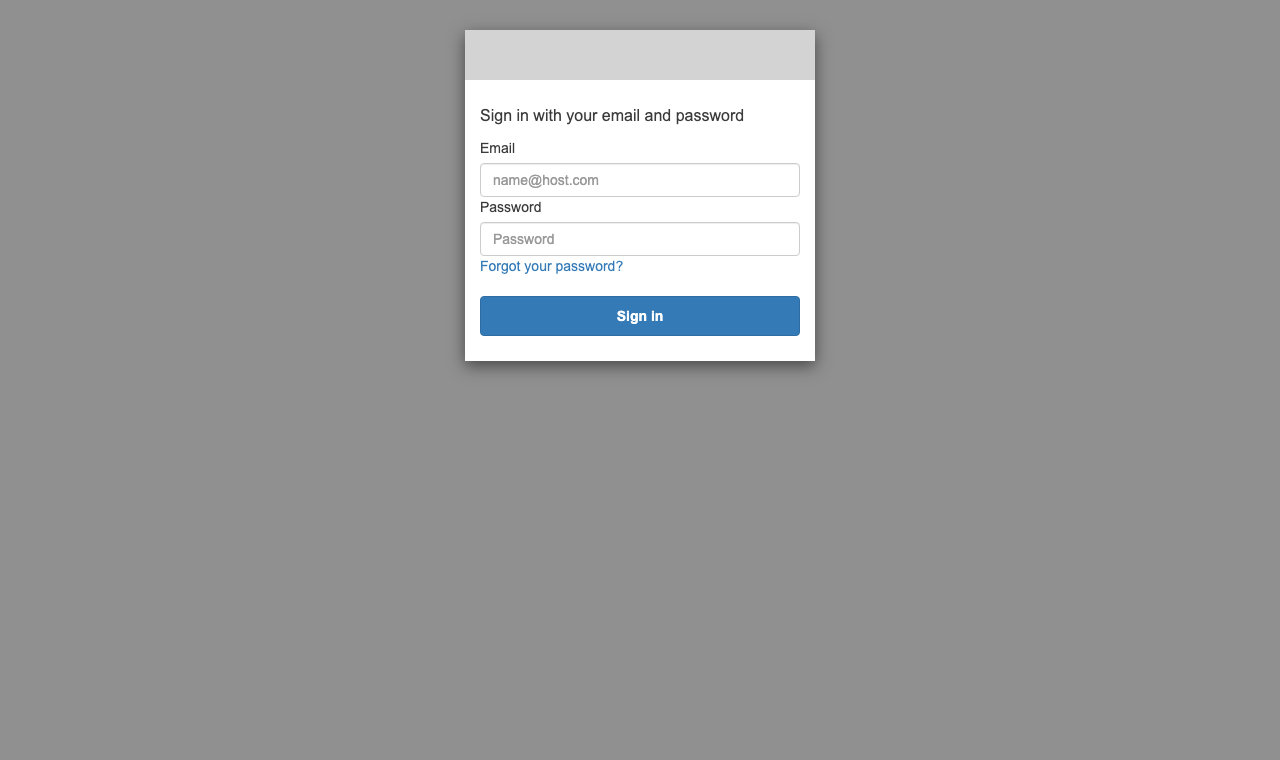
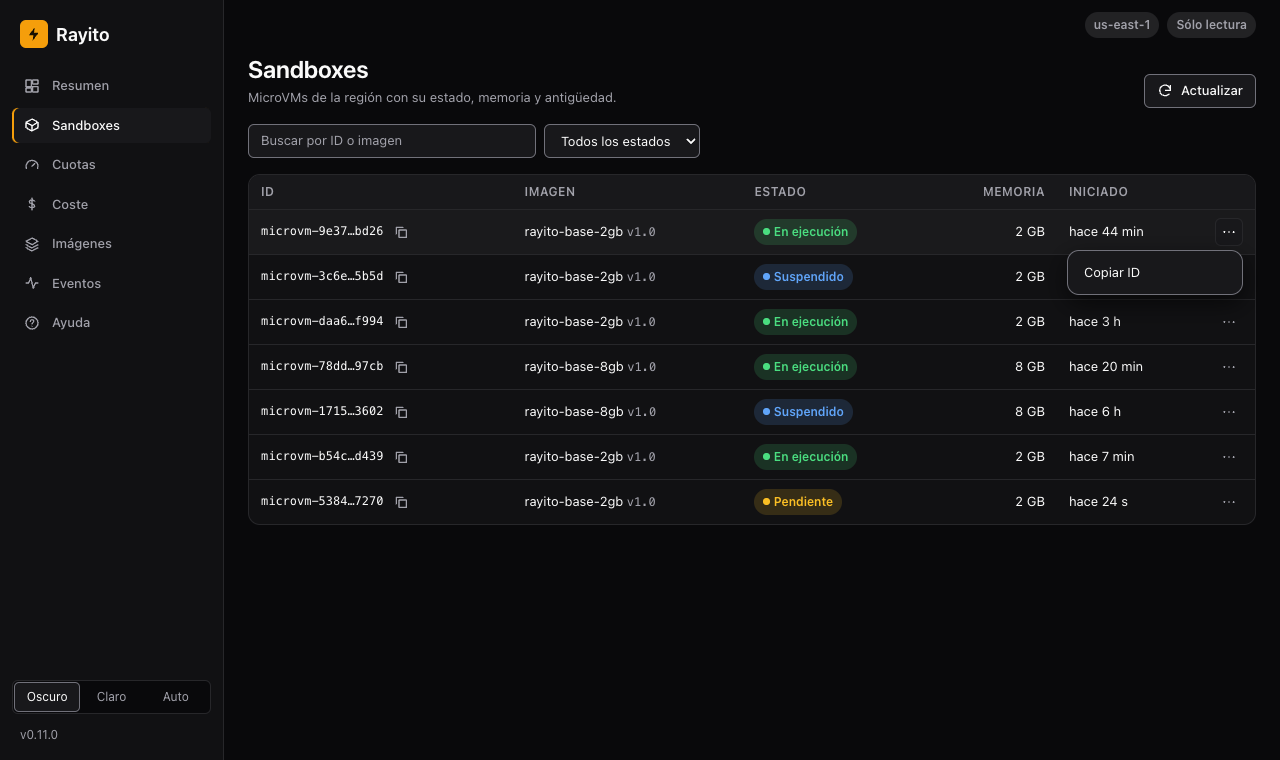
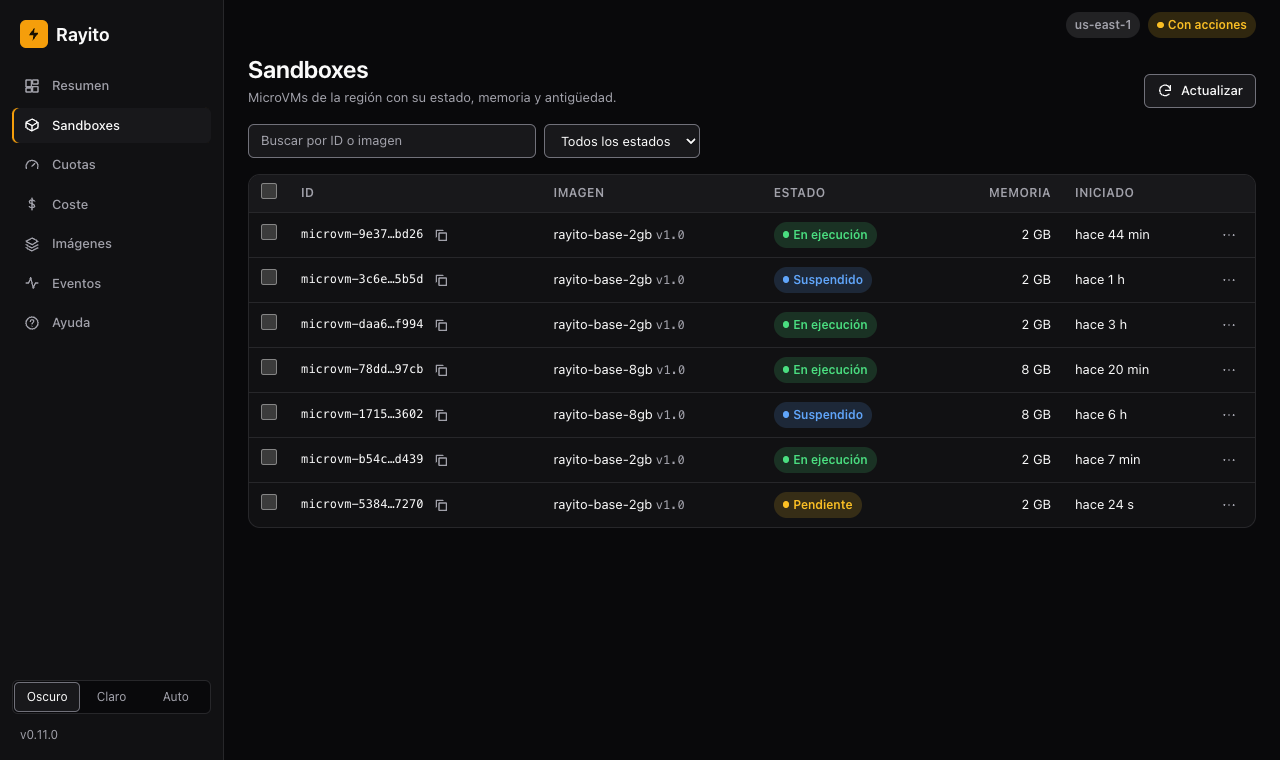
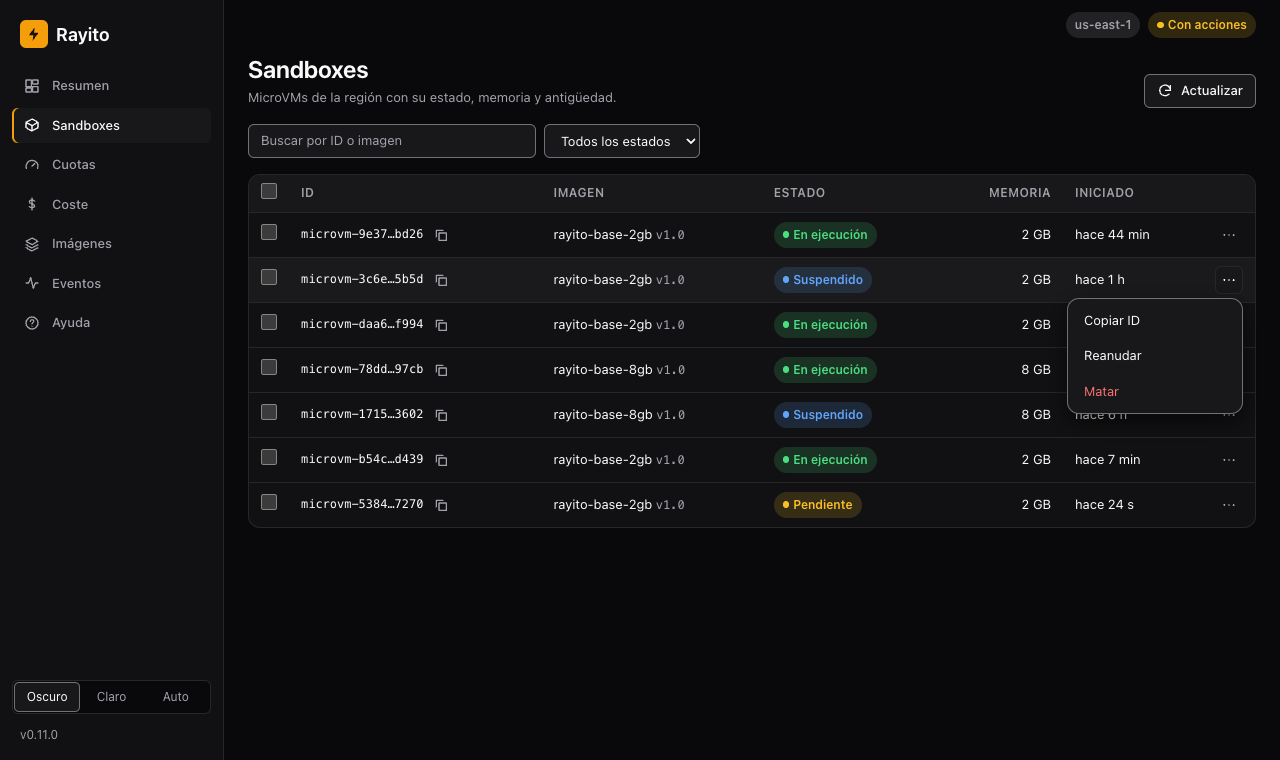
What each person sees once the stack is deployed. The stack's dashboard is the same page as the local dashboard's (plus the sign-in screen and "Sign out" («Cerrar sesión»)), so the screenshots come from the dashboard itself over sample data (made-up identifiers and sandboxes): no real URLs, domains, accounts, users or tokens, and no metadata. The sign-in one is Cognito's generic screen, with no address or domain. The dashboard's interface and the screenshots are in Spanish; the original label is given in parentheses where it helps.
1. Open DashboardUrl. Without a session, the dashboard takes you to Cognito's
sign-in. Sign in with your user's email and password; nobody can
sign up on their own.
2. A regular user sees, but does not act. The badge at the top says
Read-only ("Sólo lectura") and each row's menu only offers "Copy ID" («Copiar ID»). Even if someone
calls the API by hand, the server answers 403.
3. A user in the actions group can act. With AllowActions=true,
whoever is in the rayito-dashboard-actions group sees the With
actions ("Con acciones") badge and the selection checkboxes.
4. Pick the action. The row's menu offers suspending or killing a running sandbox (and resuming a suspended one); the dashboard asks for confirmation and leaves a row in the audit with who asked for it.
5. Check the Help. The Help ("Ayuda") entry in the sidebar summarizes the dashboard's
steps, says what is turned on and links to the guide; it works without
calling the API or any external site. It is the local dashboard's page, but
here its hints talk about the stack (the actions group, EnableCostExplorer)
and not about the CLI's --allow-actions or --cost-explorer flags, which do not
exist in this dashboard.
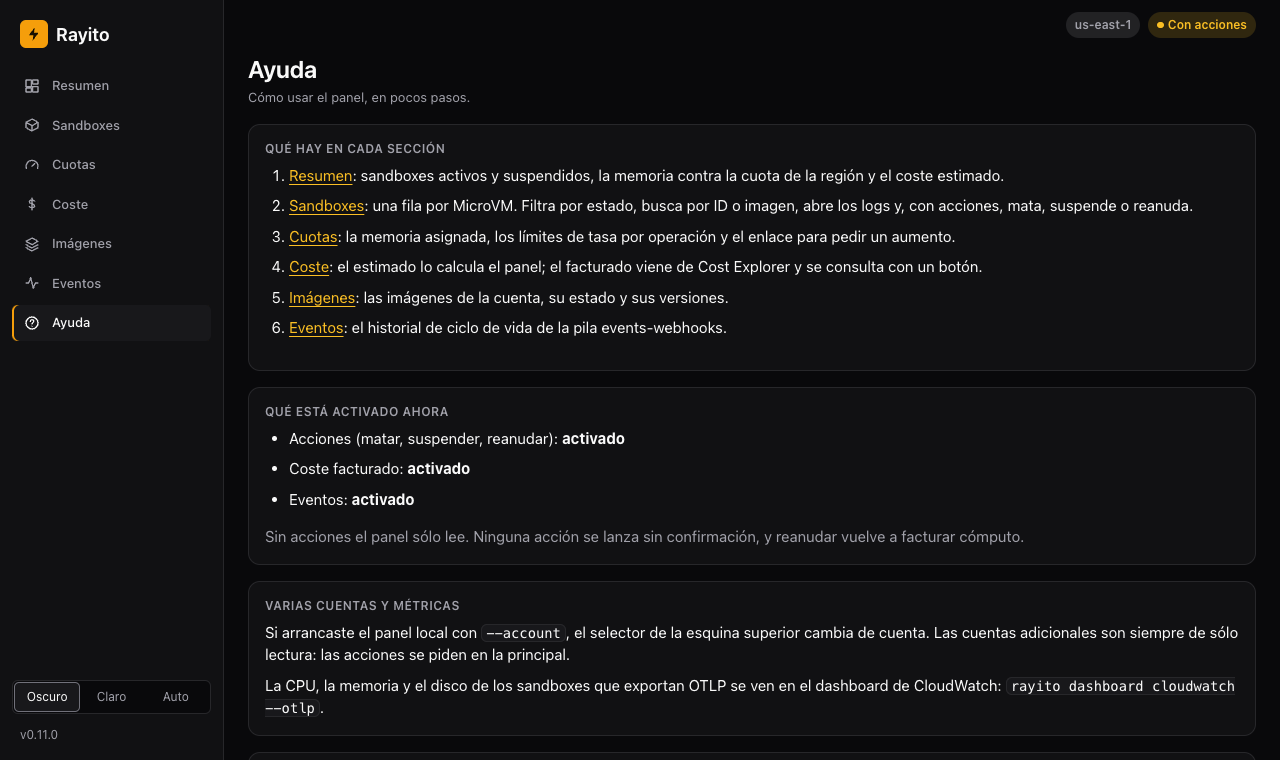
The rest of the pages (Overview, Quotas, Cost, Images and Events) are those of the local dashboard.
Who can do what¶
| Who | What they see | What they can do |
|---|---|---|
| A Cognito user | Sandboxes, images, quotas, estimated cost and (with EnableCostExplorer=true) billed |
Read only |
A user in the rayito-dashboard-actions group (with AllowActions=true) |
The same | Kill, suspend and resume, with confirmation |
The function runs with a read role, which has no permission to
act on sandboxes. Actions are performed by a different actions role,
which only trusts the function's role and which the function assumes after
checking the user's group; the session name carries the user's sub,
so CloudTrail also says who it was. That role only acts on
images whose name starts with ImageNamePrefix (rayito- by default; ""
for the whole account).
Audit¶
Each action leaves append-only rows in a DynamoDB table (AuditTableName
in the outputs): a requested row per sandbox, written before executing
(if it cannot be written, the action is not executed), and an outcome row per
request, with who (the Cognito sub and username), what (action and
sandbox), when, the request id and the source IP. Each write is
conditional (attribute_not_exists) and the function's role has no
UpdateItem or DeleteItem on the table; the template also explicitly denies
them.
aws dynamodb query --table-name <AuditTableName> \
  --key-condition-expression "pk = :p" --expression-attribute-values '{":p":{"S":"AUDIT"}}'
The table is deleted with the stack
destroy deletes the audit table. Export it first if you must
keep it (for example, with aws dynamodb scan to a file or a periodic
copy). An account administrator with permissions on the
table can, of course, change it: the "append-only" guarantee is
for the application, not for whoever administers the account.
Your color palette¶
The deployed dashboard uses the same customizable theme as the local one (Customize the theme): a JSON with the design token values (light and dark palette, radii, fonts) and, if you want, an SVG logo. There are two ways to give it to the stack:
import json

from rayito import OptionalStacks

theme = {
    "version": 1,
    "name": "my-brand",
    "dark": {"primary": "#00b2a9", "on-primary": "#04201c"},
    "light": {"primary": "#00756f", "on-primary": "#ffffff"},
}
OptionalStacks().deploy(
    "dashboard",
    artifact_bucket="my-bucket",
    parameters={"ThemeJson": json.dumps(theme)},
)
import { OptionalStacks } from "rayito";

const theme = {
  version: 1,
  name: "my-brand",
  dark: { primary: "#00b2a9", "on-primary": "#04201c" },
  light: { primary: "#00756f", "on-primary": "#ffffff" },
};
await new OptionalStacks().deploy("dashboard", {
  artifactBucket: "my-bucket",
  parameters: { ThemeJson: JSON.stringify(theme) },
});
# in a stack parameter (up to 4096 bytes):
rayito stack deploy dashboard --artifact-bucket my-bucket \
  --param "ThemeJson=$(jq -c . my-theme.json)"

# or in an SSM parameter of your own (bigger, or shared between stacks):
aws ssm put-parameter --name /my/dashboard/theme --type String --tier Advanced \
  --value file://my-theme.json
rayito stack deploy dashboard --artifact-bucket my-bucket --param ThemeParameterName=/my/dashboard/theme

# and, optionally, the logo (an SVG of up to 8192 bytes in another SSM parameter):
aws ssm put-parameter --name /my/dashboard/logo --type String --tier Advanced \
  --value file://my-logo.svg
rayito stack deploy dashboard --artifact-bucket my-bucket --param LogoParameterName=/my/dashboard/logo
ThemeJson: the theme as a stack parameter (up to 4096 bytes). The stack stores it in an SSM parameter that it creates and deletes itself.ThemeParameterName: the name (with a leading/) of an SSM parameter of yours with the theme, for a bigger one; it takes priority overThemeJson.LogoParameterName: the same for an SVG logo (up to 8192 bytes). A PNG does not fit in SSM: for a PNG logo use the local dashboard.
An Advanced parameter costs money
An Advanced SSM parameter costs $0.05 a month plus API interactions
($0.05 per 10,000; pricing,
checked on 2026-10-13), and the function rereads it while there is traffic. A
theme that fits in ThemeJson (up to 4096 bytes) uses a
Standard parameter and costs nothing.
The function rereads the parameters at most every
300 s, so a change shows up in a few
minutes without redeploying, and passes what it read through the same validation functions as --theme: the keys are a closed
list, each value must be a color, a length or a font list, and the
CSS is generated by the function, the text is never copied. An invalid theme or logo does not
bring the dashboard down: the built-in look is served and the function logs only the
reason, never the content; if SSM does not respond, it keeps the previous look. The function's role can read only that
SSM parameter. /theme.css and /theme/logo are public (like the page
itself): put nothing secret in a theme.
Check the contrast (AA) of your palette in both schemes: the dashboard does not fix it.
How it is protected¶
- Every request to
/api/v1carries a Cognito access token, in theAuthorizationheader, and the function validates it in full before routing anything or calling AWS: format and size,RS256algorithm, signature against the pool's JWKS, issuer,token_use=access, client, expiry andsub. The only unauthenticated route is the static page (HTML, CSS, JS and the theme) and/config.json, with public values (the Hosted UI domain and the client id). Without a token,401; if it cannot be checked (Cognito unreachable),503, never "pass". The user pool may have other app clients (for example a CLI one): the function only accepts the tokens of the page's client, which it locates by name. - An action does not wait for the token to expire. Before assuming the actions
role, the function asks Cognito (
AdminGetUserandAdminListGroupsForUser) whether the user is still enabled and in the actions group; if not,403, and if Cognito does not respond,503and no action is taken. Reading does not ask that question: it is validated offline. - Sign-in with PKCE against Cognito's Hosted UI: code flow,
no client secret. The token lives only in the tab's memory (never
in
localStorage, in the URL or in a cookie), so there is no cookie to protect with a CSRF token;Originis also checked on eachPOST. - Headers on every response: CSP without
unsafe-inlineorunsafe-eval(connect-srconly the own origin and the Hosted UI domain),frame-ancestors 'none',Referrer-Policy: no-referrer, HSTS andno-store. The Function URL does not enable CORS: the page is served from its own origin. - Nothing secret is logged: neither the token, nor
Authorization, nor the body; only codes. The log group has retention (LogRetentionDays). - The billed cost is capped even if any signed-in user asks for it
(also one without access to the actions). The cache key carries the
window and the region, which come from the request, so the cache alone
limits nothing. The function also only accepts windows of whole months
(
endmay be tomorrow) within the last 13 months and regions with Lambda MicroVMs, and rejects the rest with400; and it spends, only on a cache miss, a query from a budget of 20 per UTC day for the whole stack (a conditional counter in the cache table). Once exhausted,429until the next day; if the counter cannot be checked, nothing is billed. The worst day is 20 queries at $0.01, plus the extra pages of each. - An optional
ReservedConcurrencybounds what an avalanche of unauthenticated requests against the public URL can cost.
The threat detail and the accepted risks are in Security.
AWS_IAM variant: the API only answers signed requests¶
Cost and activation
- Default: off. Without
AuthMode=aws-iamthe stack is the one above (a public Function URL that validates the Cognito token). - Turns on:
rayito stack deploy dashboard --param AuthMode=aws-iam. - Resources and AWS calls: instead of a single public function, two
Function URLs: the API's (
AuthType AWS_IAM) and the page's (AuthType NONE, a second function with no permissions on MicroVMs). A Cognito identity pool, a role for signed-in users, the page function's role and an SSM parameter (Standard) with the address. In the browser, two calls per session to Cognito's identity service (GetIdandGetCredentialsForIdentity, at no cost) every hour. - Approximate cost: $0 at rest and for the new pieces (Cognito identity pools do not bill by themselves, the parameter is Standard); what is billed is the usual, Lambda invocations (pricing, 2026-10-13, us-east-1). The improvement is in security: an unsigned API request from a signed-in user is rejected by Lambda before running the function.
- IAM: whoever deploys, the same as in the default stack
(
CAPABILITY_IAM). The signed-in users' role can onlylambda:InvokeFunctionUrlandlambda:InvokeFunction(via URL) on the API function. - How to turn it off: redeploy with
AuthMode=cognito-jwt(it changes the dashboard's address) orrayito stack destroy dashboard. - Example: the one below.
What changes compared to the default variant, and why more pieces have to be touched: a
Function URL with AWS_IAM only serves requests signed with
SigV4, and a browser cannot sign the navigation to the page. So the
stack separates the two things:
| Piece | Page function | API function |
|---|---|---|
| Function URL | AuthType NONE (public) |
AuthType AWS_IAM (Lambda rejects what is not signed) |
| What it serves | the SPA and /config.json; /api/v1 is 404 |
only /api/v1; everything else is 404 |
| Permissions | logs, listing the Cognito clients and reading SSM parameters | the stack's read ones and, with actions, the actions role |
| CORS | none | only the page's origin, without credentials |
The flow: the user signs in at Cognito's Hosted UI (as
before); the page exchanges their identity token at the identity pool for
temporary AWS credentials, and signs every API call with SigV4,
which also carries the Cognito access token in the X-Rayito-Token header
(the Authorization header is taken by the signature). The API function requires
both things: the signature the Function URL already checked and the Cognito token
validated in full as always, so the groups, the live check
before acting and the audit do not change. The credentials only live in the
tab's memory and renew themselves. For whoever signs in nothing changes:
it is the same Cognito Hosted UI screen as always.
What does not change: the user opens DashboardUrl and signs in with their
Cognito user; actions, audit and billed cost work the same.
Limits to keep in mind:
- The page is public (
AuthType NONE) in both variants; whatAuthMode=aws-iamgains is that the API is no longer reachable without a valid IAM identity. It adds no protection to the static page, which carries no data. - There is no resource-based permission on the API function (a
*principal there would let signed requests from any account through): only the signed-in users' role from your account, and the Cognito token is still mandatory. - A user with their own IAM credentials who can invoke the function does not get through without a valid Cognito token either.
- Verified on real AWS (2026-10-14, Python and TypeScript): the API's Function URL
rejects an unsigned request with
403without running the function (its request id does not appear in the function's log, and therefore no invocation is billed); the CORS preflight request (OPTIONS) answers200with the page origin's headers; the identity pool's credentials are enough to invoke the API; without a Cognito token, with a junk token or with the identity token instead of the access one, the function answers401; a reader gets403when acting and a user in the actions group can act and leaves their trace in the audit. The identity pool's credentials are the same for all users: the signature proves "someone signed in to this pool" and the token decides who it is. Sign-in is the same as in the default variant (the screenshot in Walkthrough applies equally). Detail:AWS_API_NOTES.md§30, Q169.
Parameters¶
| Parameter | Default | What it does |
|---|---|---|
ArtifactBucket |
(filled in by --artifact-bucket) |
Bucket for the function's code |
AuthMode |
cognito-jwt |
aws-iam gives the API its own Function URL with SigV4 signing (AWS_IAM variant); changing it on an existing stack changes the dashboard's address |
AllowActions |
false |
true creates the actions role, the Cognito group and the audit |
EnableCostExplorer |
false |
Paid: true grants ce:GetCostAndUsage and the DynamoDB cache ($0.01 per query, at most 20 a day) |
ImageNamePrefix |
rayito- |
The actions role only acts on images with this prefix |
InitialUserEmail |
empty | Creates this Cognito user (and, with actions, adds it to the group) |
DomainPrefix |
empty | Prefix of the Hosted UI domain (unique in the region) |
ThemeJson, ThemeParameterName, LogoParameterName |
empty | Your color palette; an Advanced parameter costs $0.05 a month plus API interactions |
ReservedConcurrency |
empty | Reserved concurrency of each function in the stack (two with AuthMode=aws-iam: the account reserves twice the value); bounds what unauthenticated traffic bills |
LogRetentionDays |
30 |
Log retention |
Tags your organization requires are passed with --tag K=V (or
tags={...}): they are applied to the stack and CloudFormation propagates them to its resources.
Stack IAM¶
- Read role (the function's execution role):
lambda:ListMicrovmsandListMicrovmImages(Resource: "*", as theList*operations require),ListMicrovmImageVersionsandGetMicrovmImageVersionon the account's images,servicequotas:ListServiceQuotas,cognito-idp:ListUserPoolClientson its pool, its own logs and, only if you turn them on,ce:GetCostAndUsageand read/write of the cache table (EnableCostExplorer;UpdateItemis the daily budget counter),dynamodb:PutItemon the audit table,cognito-idp:AdminGetUserandAdminListGroupsForUseron its pool andsts:AssumeRoleon the actions role (AllowActions) andssm:GetParameteron the theme or logo parameter. - Actions role (only with
AllowActions=true):lambda:TerminateMicrovm,SuspendMicrovmandResumeMicrovmon the account'sImageNamePrefix*images. It trusts only the read role.
What this phase does not include¶
- CloudWatch logs and events view: they depend on the
events-webhooksstack and on log-read permissions this stack does not grant yet. The page marks it as "not available". - List of recent actions (
GET /api/v1/actions): it is per function execution environment; the source of truth for what happened is the audit table. - Long bulk actions: they run inside the request, one by one and at the operation's TPS pace (suspend, 2 TPS), with the function's maximum time (300 s): 100 sandboxes at 2 TPS are about 50 s.
refresh=trueon the billed cost does not skip the DynamoDB cache, which lasts 24 h. What limits spending is not the cache but the caps in How it is protected: bounded windows and regions and a budget of 20 paid queries per UTC day for the whole stack, not per user.- An already issued access token cannot be revoked: the function validates it
offline (signature, expiry and the groups the token itself carries), and neither
aws cognito-idp admin-user-global-sign-out, nor disabling the user, nor removing them from the group invalidates it; global sign-out only prevents renewing it. It stays valid until it expires (1 h) and until then that user can read. To act, access is cut right away, because the function checks it in Cognito before each action. There is no parameter to shorten the token's validity.
Variants¶
AWS_IAMon the Function URL with a Cognito identity pool and SigV4: it exists, behind an explicit parameter; see the next section.- CloudFront + S3 for the static page and the Function URL only for the API: it fits if your organization allows CloudFront and S3 buckets, and adds caching and a custom domain with a certificate. No template is included and it is not tested: this project's test account denies creating CloudFront distributions and buckets, and that is why the default variant avoids them. If you build it yourself, keep the same headers and the token validation in the function.
- A custom domain in front of the Function URL requires CloudFront (see Custom domain, which is another feature).