Management dashboard: quotas, cost and fleet¶
The SDK services that feed the MicroVM management dashboard
(ADR-026 in ARCHITECTURE.md): Quotas (applied Lambda MicroVMs quotas and
allocated memory against the region's quota), UsageCost (cost billed
by Cost Explorer and estimated cost per sandbox) and Fleet (sandboxes,
images, events and bulk actions). They work on their own, without any server:
you read your own data with your credentials.
What is here
The page covers the SDK services (synchronous and asynchronous Python, and
TypeScript, with the same surface) and the local web dashboard
(rayito dashboard, in the Python CLI and in the TypeScript one), which is built on top of
them: jump to the dashboard. The optional dashboard stack
in your account (phase 2) has its own page:
Dashboard in your account.
Cost and activation
- Default: off. Building
Quotas,UsageCostorFleetdoes not call AWS, create any client or import any optional peer. Without calling a method nothing happens, and a test in each SDK checks it. - Turns on: an explicit call:
Quotas.report(),UsageCost.billed()(the only one that uses Cost Explorer;estimate()does not), or anyFleetmethod. Bulk actions (Fleet.run_bulk/runBulk) also requireallow_actions=True/allowActions: true: by default the service is read-only. - Resources and AWS calls: reads only, no new resources.
ListServiceQuotas(codelambda),ListMicrovms,GetMicrovmImageVersion(at most one per image version and process),ListMicrovmImagesandListMicrovmImageVersions; withbilled(),ce:GetCostAndUsagein us-east-1; with actions,TerminateMicrovm,SuspendMicrovmandResumeMicrovmon the sandboxes you indicate. In TypeScript, the Service Quotas and Cost Explorer clients are optional peers imported on the first call. Detail:AWS_API_NOTES.md§30. - Approximate cost (us-east-1, checked 2026-10-13): $0 for the
Lambda MicroVMs reads (
sandboxes,images,image_versions),estimate()andQuotas.report(); Service Quotas publishes no per-query rate (guide), andplan_bulkis a local computation. Paid:UsageCost.billed()charges $0.01 per request to Cost Explorer (pricing), one per window (one per page if there are more, andDAILYover long windows paginates) on each cache miss, andrefresh=Truealways pays. The cache is in memory, per instance (it is lost when the process ends or anotherUsageCostis created), holds at most 64 windows and is indexed by start, end, granularity and region: reuse a single instance and a month comes to around 30 requests, ≈ $0.30; with a new instance per call (cron, Lambda, script) eachbilled()pays $0.01.Fleet.events()is also paid, though minimal: on-demand DynamoDB reads on theevents-webhookstable, with no polling. Actions are not billed per call, but they change the bill (AWS_API_NOTES.md§12):killstops billing compute;suspendwrites a snapshot ($0.0038/GB) and pays storage ($0.08/GB-month) while suspended;resumereads the snapshot ($0.00155/GB) and bills compute again at the price of its size ($0.1261/h with 2 GB and 1 vCPU), so resuming many sandboxes at once raises the bill. - IAM:
servicequotas:ListServiceQuotas,lambda:ListMicrovms,lambda:GetMicrovmImageVersion,lambda:ListMicrovmImagesandlambda:ListMicrovmImageVersionsto read;ce:GetCostAndUsageonly forbilled();lambda:TerminateMicrovm,lambda:SuspendMicrovmandlambda:ResumeMicrovmonly for the actions. See Minimum IAM. - How to turn it off: do not call the methods (there is nothing to delete).
To drop Cost Explorer, just do not call
billed(); to prevent actions, do not passallow_actions=Trueand do not grant the three write permissions. - Example:
When to use it¶
- You want to know how much of your regional quota's memory the
RUNNINGand suspended sandboxes take up, and have something warn you before hitting the limit. - You want to see the account's MicroVM cost by usage type, or an estimate per sandbox, without leaving your code.
- You want to see it all in the browser, without writing code: start the
local web dashboard with
rayito dashboard. - You operate a fleet and need to list sandboxes with their image's memory, images and versions, or suspend and kill in bulk while respecting TPS.
- When not to: for invoicing or allocating costs. The per-sandbox cost is an estimate and never replaces the bill; for that, Cost Explorer or your account's cost and usage report.
Quotas and allocated memory¶
Quotas.report() brings together three things: the region's applied quotas
(Service Quotas), the RUNNING, SUSPENDING and SUSPENDED sandboxes from
ListMicrovms with their image's minimum memory, and the warnings.
from rayito import Quotas

report = Quotas(region="us-east-1").report()
memory = report.memory
print(memory.allocated_gb, memory.quota_gb, memory.level)  # (1)!
for warning in report.warnings:
    print(warning.kind, warning.message, warning.increase_url)  # (2)!
print(report.applied_rate("SuspendMicrovm"))  # (3)!
levelisok,warning(from 80 % of the quota) orcritical(from 95 %); the thresholds are constants inlimits.json.- Each warning carries the Service Quotas console link to request the increase: requesting it is not an SDK action.
- The applied TPS rate of an operation (2 for
SuspendMicrovmby default), orNoneif Service Quotas does not list it.
import { Quotas } from "rayito";

const report = await new Quotas({ region: "us-east-1" }).report();
const { memory } = report;
console.log(memory.allocatedGb, memory.quotaGb, memory.level);
for (const warning of report.warnings) {
  console.log(warning.kind, warning.message, warning.increaseUrl);
}
console.log(report.appliedRate("SuspendMicrovm"));
| Field | What it is |
|---|---|
memory |
allocated memory (GB) against the quota (ARM_64), the fraction, the level, the sandboxes counted and how many have an unresolved image memory (unresolved: actual usage may be higher) |
entries |
the catalog's 18 quotas with their applied value (None/undefined if Service Quotas does not list it), the region's default value and the increase link |
tps |
applied rate and burst of each operation |
warnings |
memory_high, memory_critical, below_default (new accounts start with reduced quotas) and not_listed |
Measured on real AWS
Tested on 2026-10-14 in us-east-1: Service Quotas does not publish
utilization for any of the 26 MicroVM quotas, so memory usage
is always what the SDK computes; ListMicrovms and
ListMicrovmImages accept about 5 calls per second per account (any
faster, ThrottlingException) and are not among the quotas. It is still not
verified whether the memory quota counts the image's minimum memory or
the memory the guest sees. Detail: AWS_API_NOTES.md §30 (Q163 and Q164).
Billed cost and estimated cost¶
They are two different things and each result carries its label.
billed() |
estimate() |
|
|---|---|---|
| Label | billed |
estimated |
| Where it comes from | Cost Explorer, grouped by usage type (Lambda-MicroVM-*) |
time elapsed since each RUNNING sandbox started times the baseline compute price |
| Delay | about 24 h; partial warns of periods still estimated by AWS |
none |
| Costs | $0.01 per request, with a 24 h local cache | $0 |
| What it does not include | other services | snapshots (read, write, storage), consumption above the baseline, and the active time of suspended ones |
from rayito import UsageCost

cost = UsageCost()
billed = cost.billed()  # (1)!
print(billed.total_usd, billed.partial, billed.requests)
for line in billed.lines:
    print(line.component, line.quantity, line.unit, line.cost_usd)

estimate = cost.estimate()  # (2)!
print(estimate.label, estimate.total_usd)
- By default, from day 1 of the current month (UTC) to tomorrow. It accepts
start,end(datetime.dateorYYYY-MM-DD),granularity(MONTHLYby default),regionandrefresh=Trueto skip the cache. - The estimate never calls Cost Explorer.
import { UsageCost } from "rayito";

const cost = new UsageCost();
const billed = await cost.billed({ start: "2026-10-01", end: "2026-10-13" });
console.log(billed.totalUsd, billed.partial, billed.requests);
for (const line of billed.lines) {
  console.log(line.component, line.quantity, line.unit, line.costUsd);
}
const estimate = await cost.estimate();
console.log(estimate.label, estimate.totalUsd);
estimate().items carries one item per counted sandbox; suspended ones
and those of unknown memory come out with an empty cost_usd/costUsd. In
TypeScript, billed() needs the optional package
@aws-sdk/client-cost-explorer, and Quotas.report()
@aws-sdk/client-service-quotas; without them the error names the package to
install.
Sandboxes, images, events and actions¶
Fleet is the operations view: the inventory with each image's memory,
the image catalog and its versions, the event history and
the bulk actions.
from rayito import Fleet, Quotas

fleet = Fleet(region="us-east-1", allow_actions=True)  # (1)!
running = fleet.sandboxes(states={"RUNNING"})
print([(view.sandbox_id, view.memory_mib) for view in running])

rate = Quotas(region="us-east-1").report().applied_rate("SuspendMicrovm")
plan = fleet.plan_bulk("suspend", len(running), applied_rate=rate)  # (2)!
print(plan.tps, plan.estimated_seconds)

result = fleet.run_bulk(
    "suspend",
    [view.sandbox_id for view in running],
    applied_rate=rate,
    on_progress=lambda progress: print(progress.done, progress.total),
)
print(result.count("done"), result.count("failed"))
- Without
allow_actions=True,run_bulkraisesInvalidArgumentExceptionbefore calling anyone. - The queue goes at the lower of the two rates: the
apiTpsone (SuspendMicrovm: 2 TPS) and your account's applied quota.
import { Fleet, Quotas } from "rayito";

const fleet = new Fleet({ region: "us-east-1", allowActions: true });
const running = await fleet.sandboxes({ states: ["RUNNING"] });
console.log(running.map((view) => [view.sandboxId, view.memoryMib]));

const rate = (await new Quotas({ region: "us-east-1" }).report()).appliedRate("SuspendMicrovm");
const result = await fleet.runBulk(
  "suspend",
  running.map((view) => view.sandboxId),
  {
    appliedRate: rate,
    onProgress: (progress) => console.log(progress.done, progress.total),
  },
);
console.log(result.count("done"), result.count("failed"));
- Inventory:
ListMicrovmsonly brings the id, the state, the image, the version andstartedAt(no tags or metadata filters). The view adds the image's minimum memory. It never carriesenvs, therunHookPayload, tokens or the endpoint. - Images:
images()andimage_versions()/imageVersions()(the newest version first). Of each artifact only the file name is kept, never the bucket or the path. - Events:
events()reads the history of theevents-webhooksstack ifevents=LifecycleEvents(...)is passed; without it, it raisesInvalidArgumentException, because the SDK deploys nothing on its own. - Bulk actions: kill (
kill), suspend (suspend) and resume (resume), one by one and at the pace of the operation's TPS quota. A failure of one sandbox does not stop the others: it ends upfailedwith AWS's code (never its message):ServiceQuotaExceededExceptionorInsufficientCapacityExceptionif the account runs out of quota or capacity, andUnknownErrorif the error carries no code. A non-positive applied quota inapplied_rateisInvalidArgumentException. An action on a sandbox that needs nothing (for example, suspending one that is notRUNNING) ends upunchanged. A repeated id is applied only once.
Local web dashboard: rayito dashboard¶
rayito dashboard starts on your machine a server at 127.0.0.1 that
serves a page (ES modules and web components, no build step, packaged in
the Python wheel and in the npm package; a single copy in the repository) and the JSON API /api/v1
over the same Quotas, UsageCost and Fleet services. It uses your
AWS credentials and leaves nothing deployed: pressing Ctrl+C ends it.
Cost and activation of the local dashboard
- Default: off, and read-only. Until you run
rayito dashboardthere is no process, call or AWS client. Starting it does not call AWS either: each view calls when you open it. - Turns on:
rayito dashboard. With--allow-actions, kill, suspend and resume (with confirmation). With--cost-explorer, the billed cost query (a button; it never fires on its own). With--events-stack <name>, the events view. - Resources and AWS calls: reads only and no new resources:
ListMicrovms,GetMicrovmImageVersion,ListMicrovmImages,ListMicrovmImageVersions,ListServiceQuotasand, when requesting a sandbox's logs,GetMicrovm,DescribeLogStreamsandGetLogEvents. A cache of seconds keeps several tabs from multiplying the calls. - Approximate cost: $0 for the reads of sandboxes, images, quotas and
logs (
DescribeLogStreamsandGetLogEventshave no published rate of their own in CloudWatch; only ingestion, storage and Logs Insights are charged, and the dashboard runs no Logs Insights queries). Paid, and only if you turn it on: with--cost-explorer, Cost Explorer charges $0.01 per query (pricing, us-east-1, checked 2026-10-13), also with "Ignore cache" ("Ignorar la caché"); each window is kept 24 h in memory (lost when the dashboard closes). With--events-stack, the events view reads the stack's DynamoDB table (on-demand reads, a few per view and no polling). With--allow-actions, actions are not billed per call but change the bill (AWS_API_NOTES.md§12): kill stops billing compute; suspend writes a snapshot ($0.0038/GB) and pays storage ($0.08/GB-month); resume reads the snapshot ($0.00155/GB) and bills compute again. Startup announces it in the first line when--cost-exploreris active. - IAM: those of Minimum IAM;
lambda:GetMicrovm,logs:DescribeLogStreamsandlogs:GetLogEventsfor the logs. - How to turn it off: Ctrl+C. There is nothing to delete.
- Example:
Starting it¶
AWS_REGION=us-east-1 rayito dashboard
# Panel de Rayito (us-east-1, sólo lectura). Ábrelo en tu navegador:
# http://127.0.0.1:<port>/?token=<shown only once>
The URL carries a single-use token: open it in your browser (or use
--open) and the server exchanges it for a session cookie. If you lose it or
use it up, close the dashboard and start it again. The port is a random free one
unless you pass --port.
| Option | What it does |
|---|---|
--port N |
Local port (by default a random free one). It only listens on 127.0.0.1. |
--allow-actions |
Enables kill, suspend and resume. Without it, the server rejects any action and does not call AWS. Resuming bills compute again. |
--cost-explorer |
Paid: allows querying the billed cost (each query costs $0.01, also "Ignore cache"). |
--events-stack NAME |
Name of the deployed events-webhooks stack: turns on the events view (DynamoDB reads, paid though minimal). |
--log-group GROUP |
CloudWatch group for the logs (by default, each image's); no rate of its own to read them. |
--theme FILE |
Your own theme (.json or .css), also through RAYITO_DASHBOARD_THEME. See Customize the theme. |
--logo FILE |
Your own logo (PNG or SVG of up to 262144 bytes), also through RAYITO_DASHBOARD_LOGO. |
--open |
Opens the startup URL in the browser. |
Step-by-step walkthrough¶
A walkthrough of the local dashboard, with the screenshots of each step. All the images come from the dashboard itself over sample data (made-up sandboxes, amounts and logs, with placeholder identifiers): no real accounts, URLs, tokens or names, and no metadata. Your values will be different. The dashboard's interface and the screenshots are in Spanish; the original label is given in parentheses where it helps.
1. Install the CLI. The dashboard is a command of both CLIs, with the same page and the same API:
npm install --global rayito      # or: npx rayito dashboard --help
npm install --global @aws-sdk/client-service-quotas
rayito dashboard --help
@aws-sdk/client-service-quotas is an optional peer: without it, the
dashboard's quotas view returns an error that names the package to
install. With --cost-explorer you need @aws-sdk/client-cost-explorer,
with --events-stack, @aws-sdk/client-dynamodb and, for a sandbox's
logs, @aws-sdk/client-cloudwatch-logs.
2. Start the dashboard. With --allow-actions to be able to act and, if you have
the events stack, with --events-stack:
Open the URL it prints (single-use). At the top right you see the region and the mode: With actions ("Con acciones") or Read-only ("Sólo lectura").
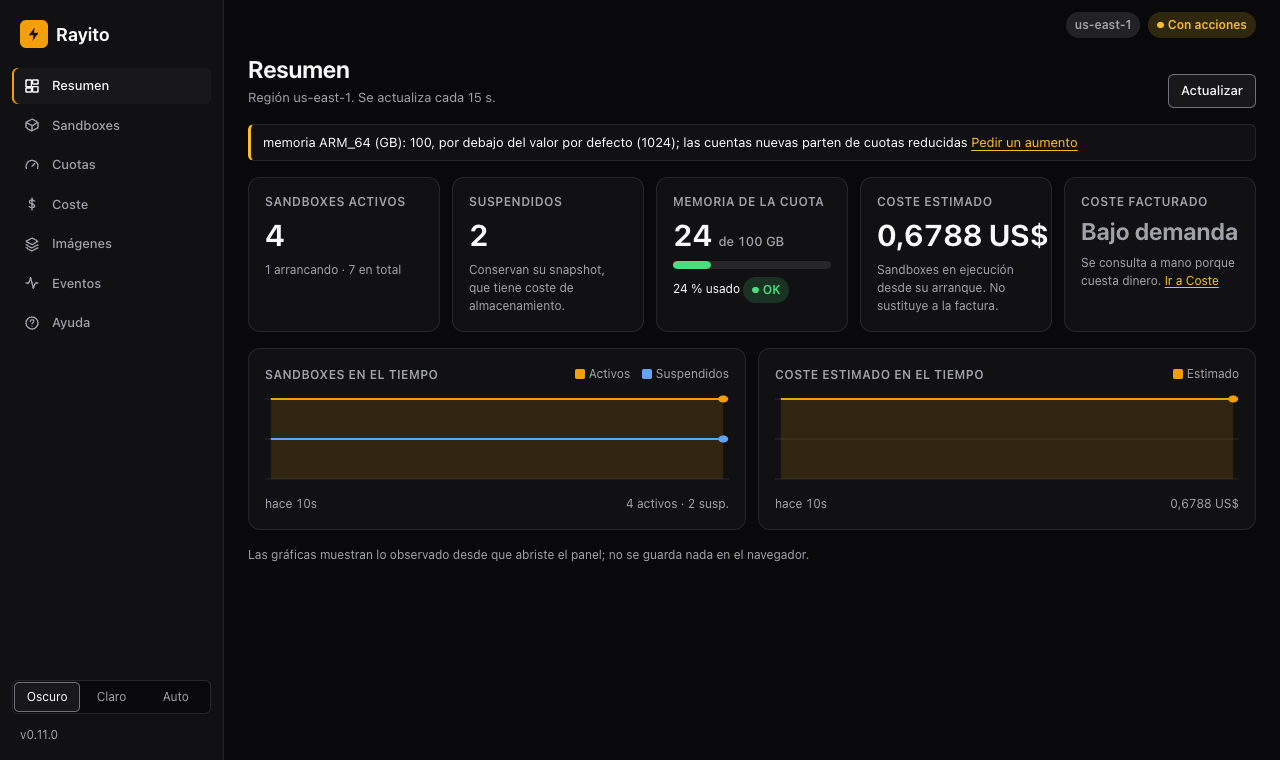
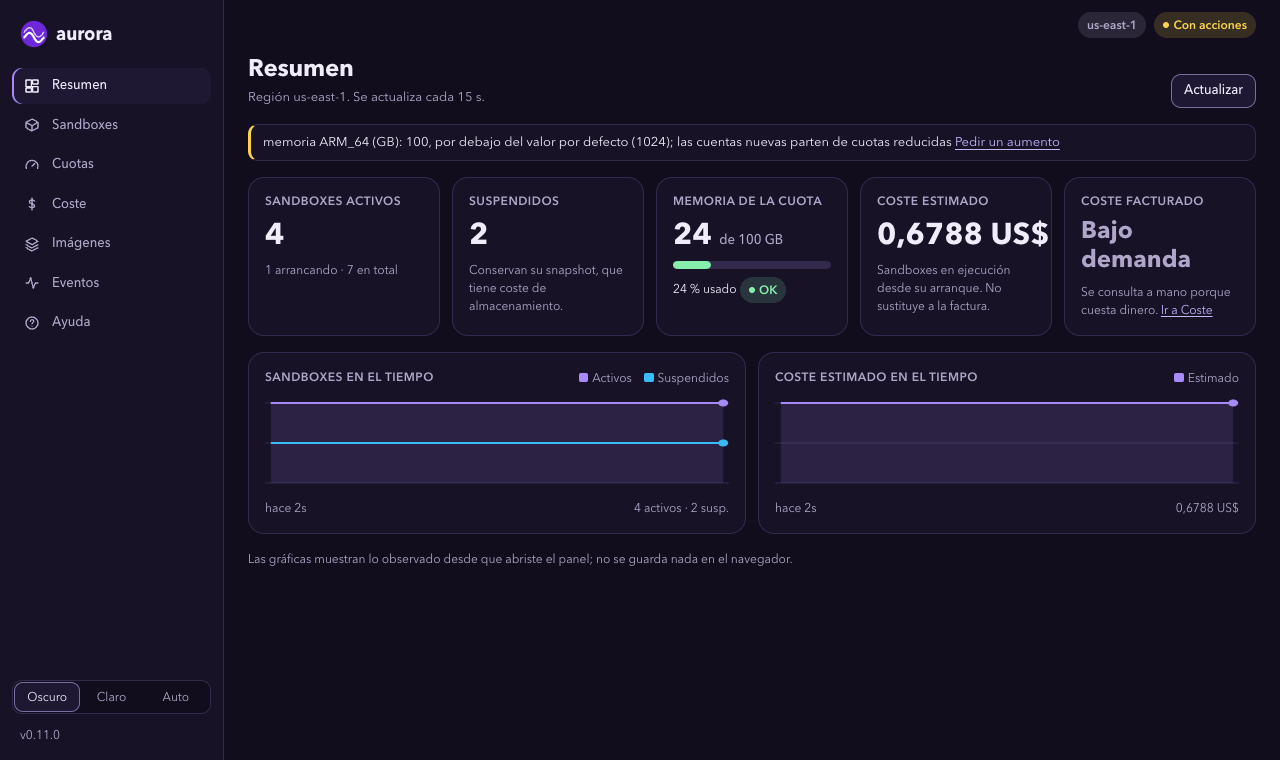
3. Look at the Overview. Active and suspended sandboxes, memory against the region's quota, the estimated cost and, separately and off by default, the billed one.
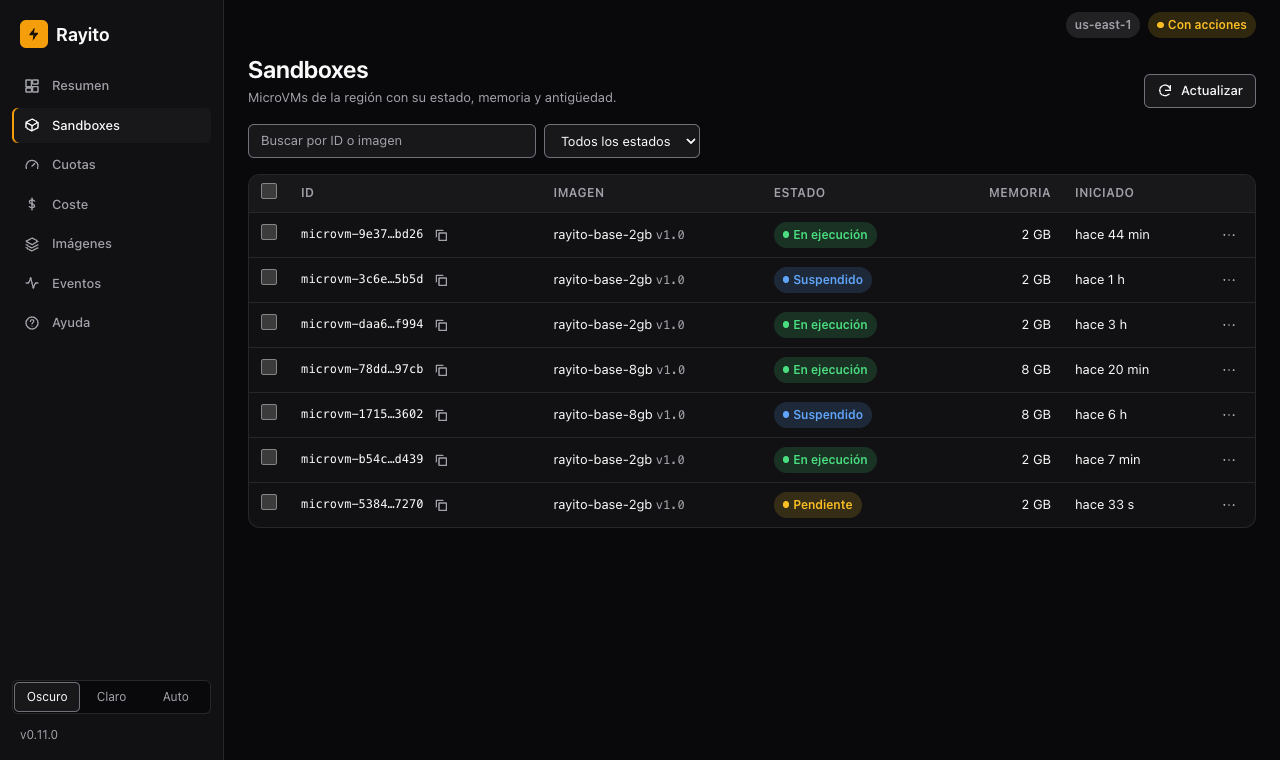
4. Open Sandboxes. One row per MicroVM, with its state, memory and age. Filter by state or search by ID or image.
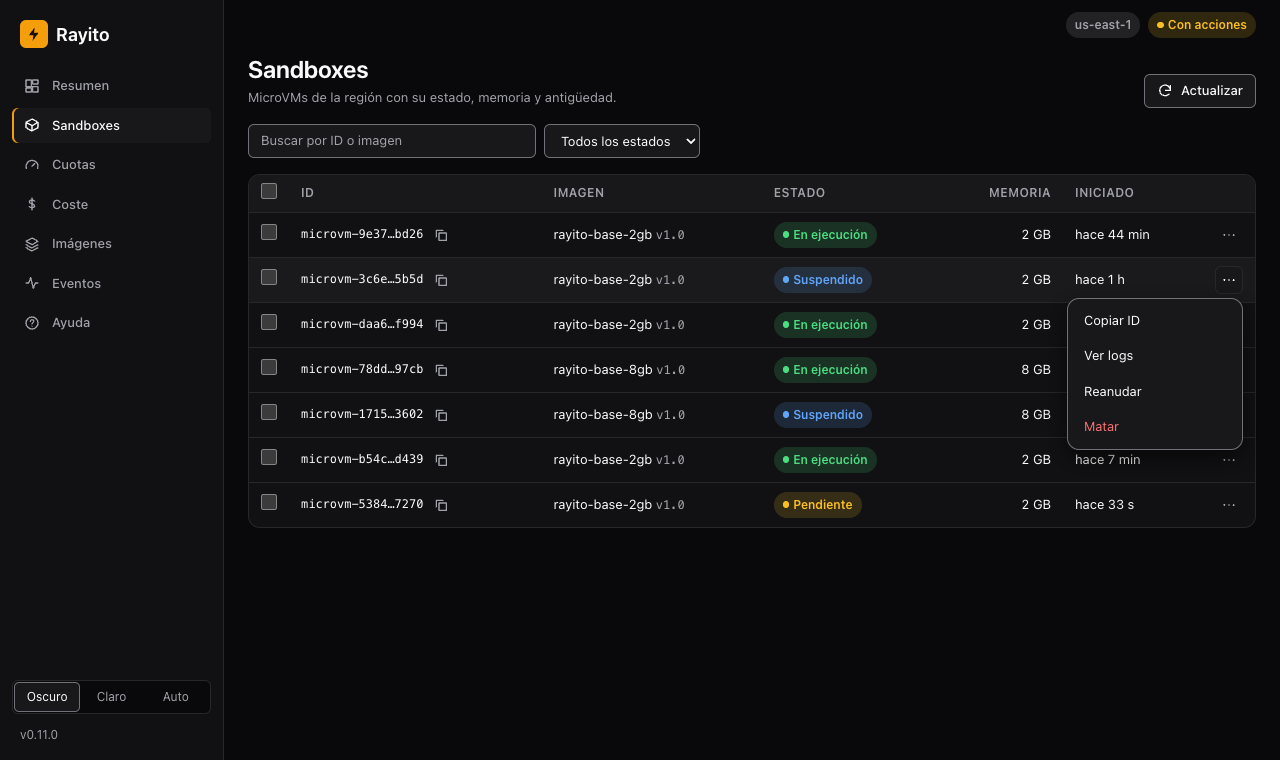
5. Open a row's menu (⋯). Copy the ID, open the logs or launch an
action. Without --allow-actions the menu only offers "Copy ID" («Copiar ID») and "View logs" («Ver logs»).
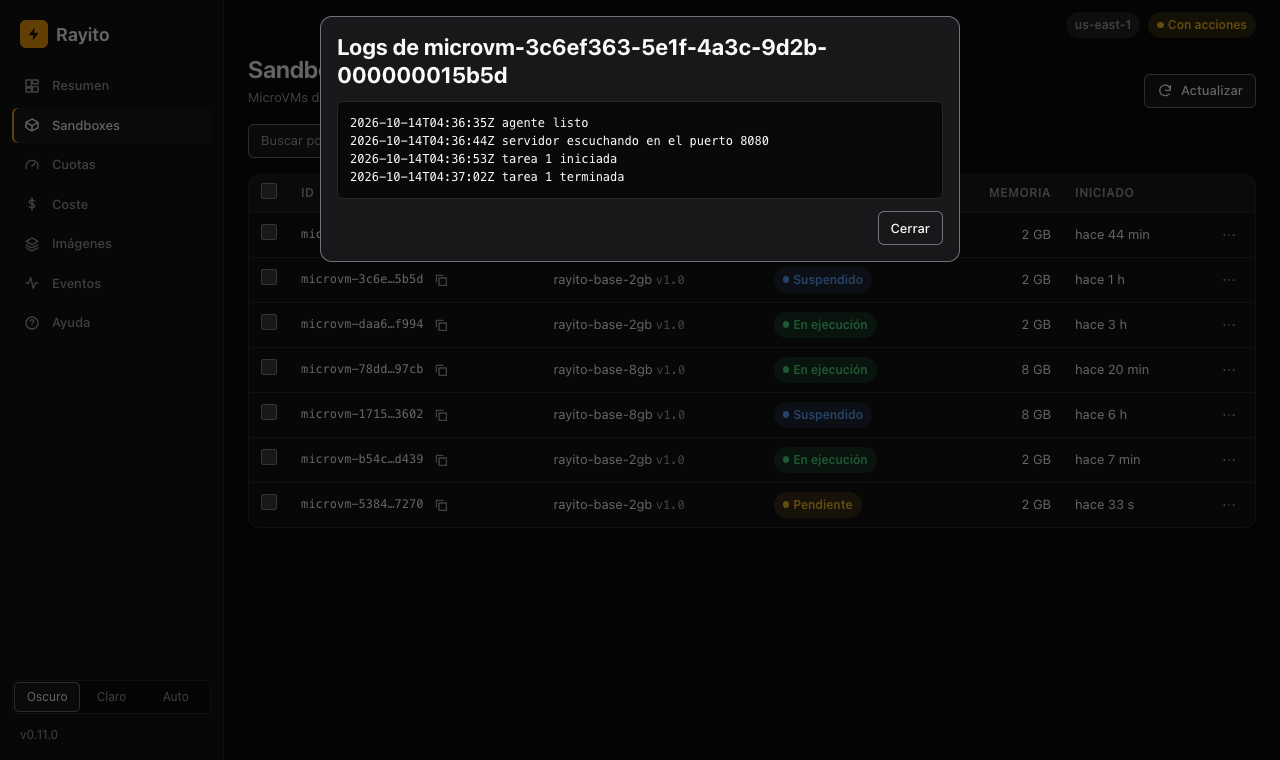
6. Read a sandbox's logs. "View logs" opens the lines of the sandbox's CloudWatch group; reading them has no rate of its own.
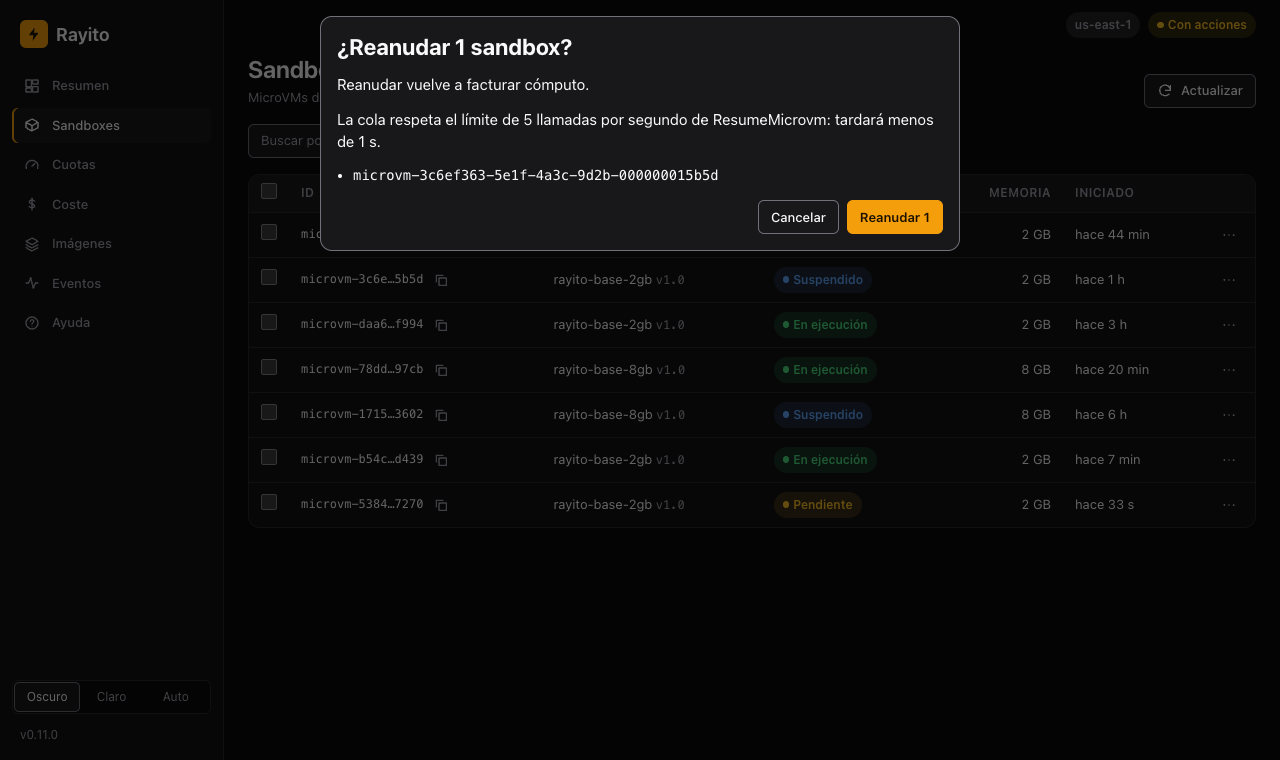
7. Confirm the action. The dashboard says what you are about to do, to how many sandboxes and how long the queue will take. Resuming bills compute again.
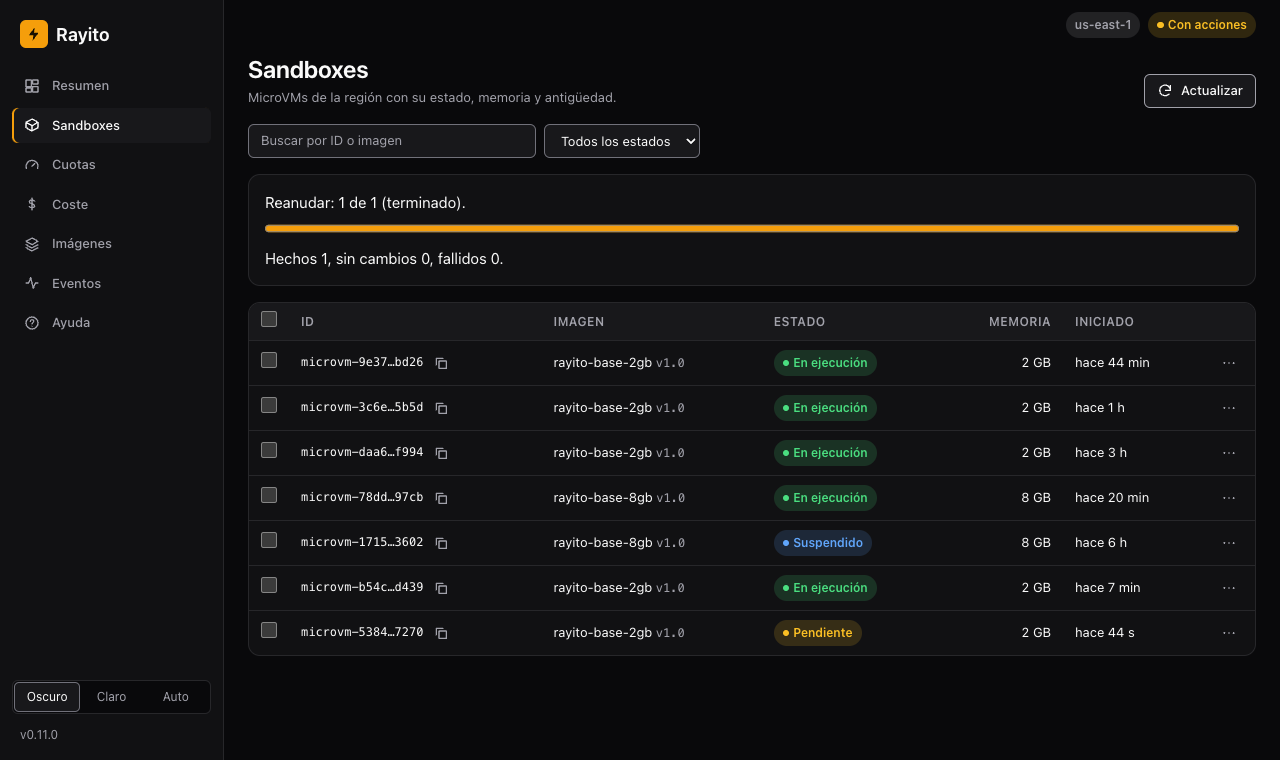
8. Check the result. The progress bar summarizes how many were done, how many did not change and how many failed; the table is updated.
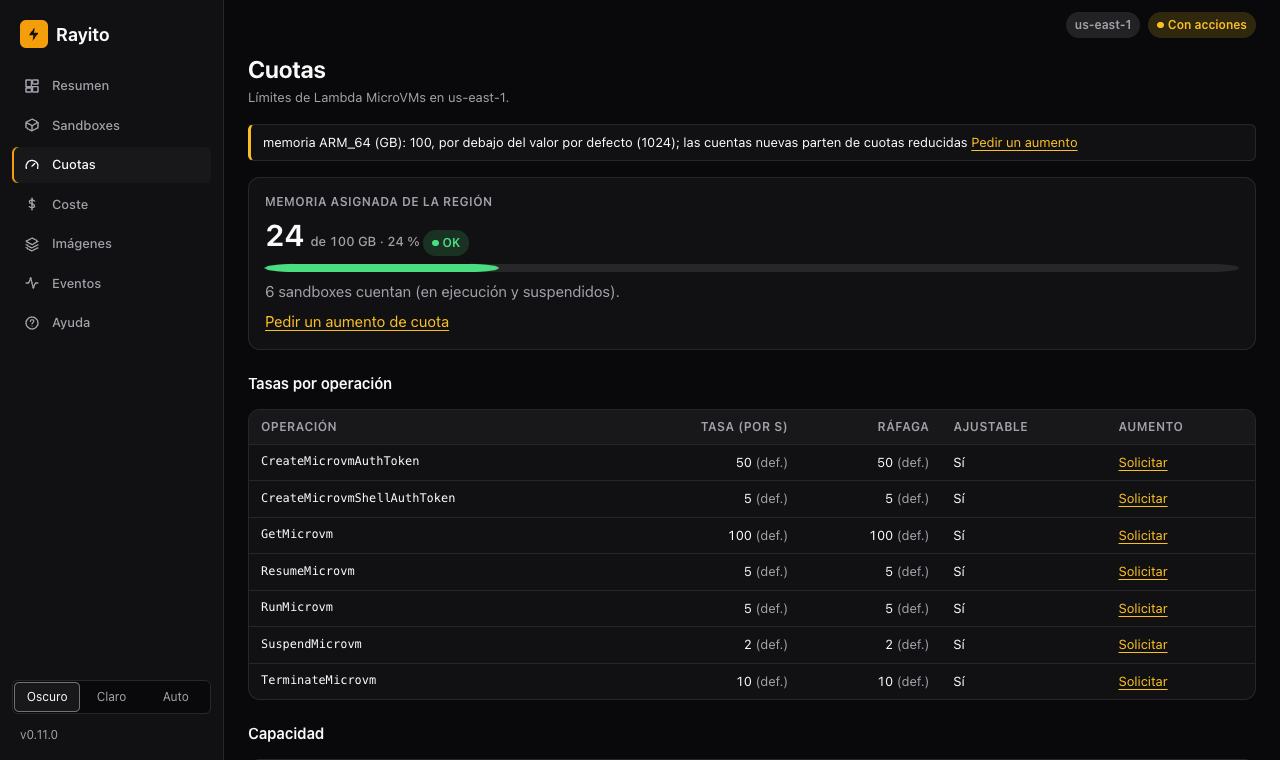
9. Review the Quotas. Allocated memory against the quota, the rate limits per operation and the capacity quotas, with the link to request an increase.
10. Look at the Cost, estimated and billed. Estimated is computed by the
dashboard and is free. Billed comes from Cost Explorer and is paid: it only
exists with --cost-explorer and by pressing the button (each query costs
$0.01, also "Ignore cache").
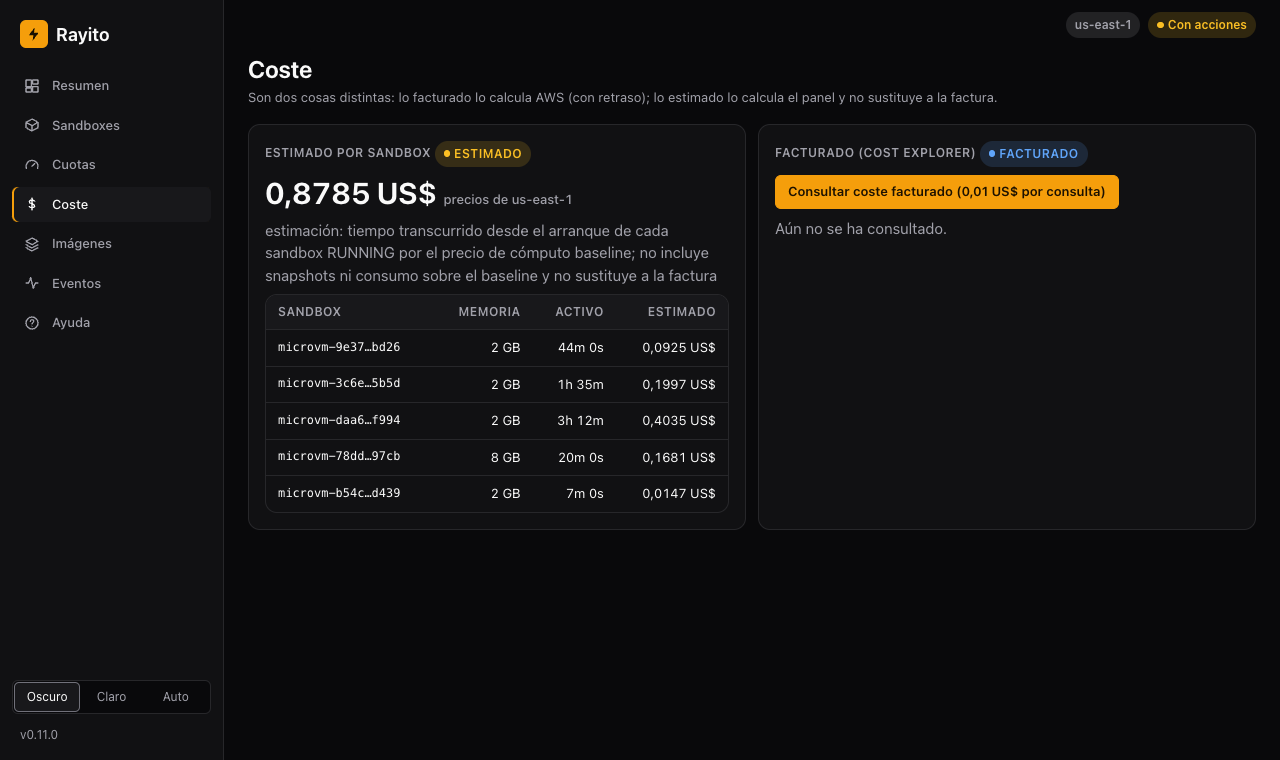
With --cost-explorer and after pressing the button, the dashboard shows the billed cost by
usage type next to the estimated one. Cost Explorer has about 24 h of delay and the
estimate never replaces the bill. The amounts in the screenshot are
samples.
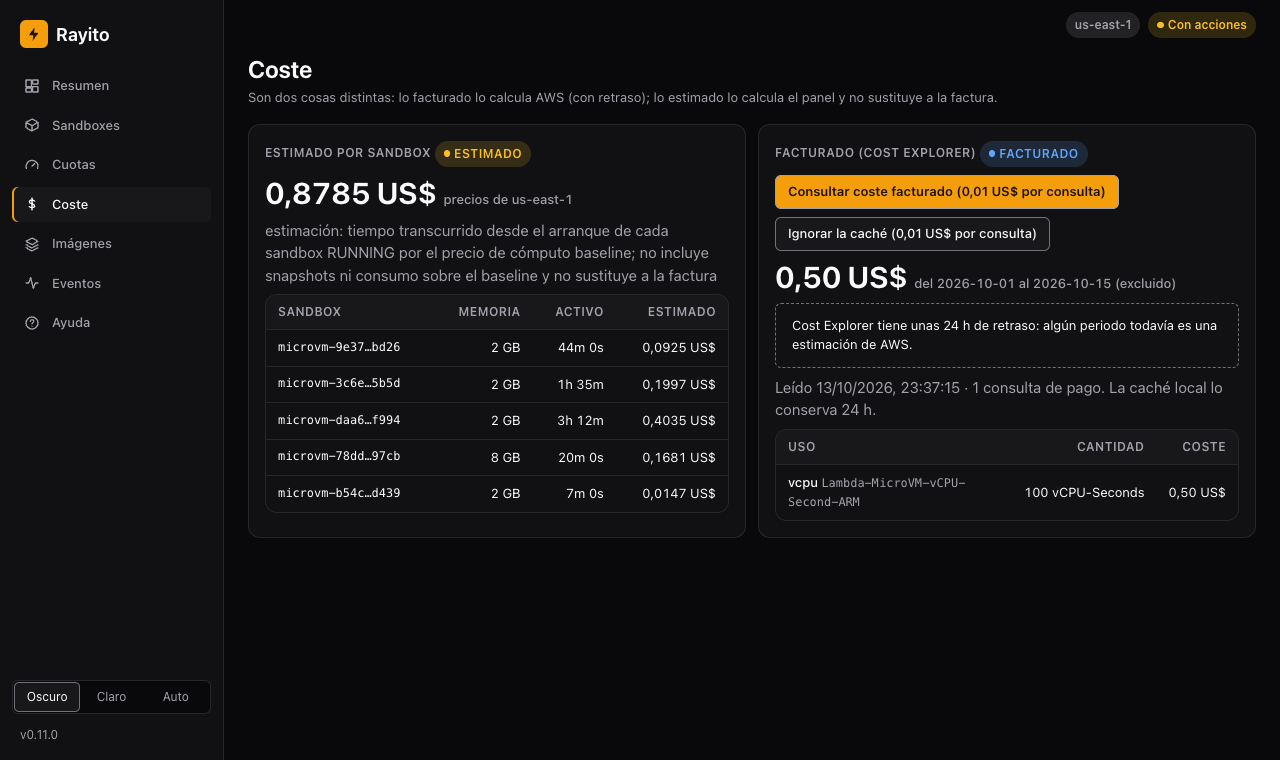
Cost and activation of the billed cost
- Turns on:
rayito dashboard --cost-explorerand pressing "Query billed cost" ("Consultar coste facturado"). Nothing fires it on its own. - Approximate cost: $0.01 per Cost Explorer query (pricing, us-east-1, checked 2026-10-13); each window is kept 24 h in memory.
- How to turn it off: start the dashboard without
--cost-explorer.
11. Look at the Images. The account's images, their state and their latest active version.
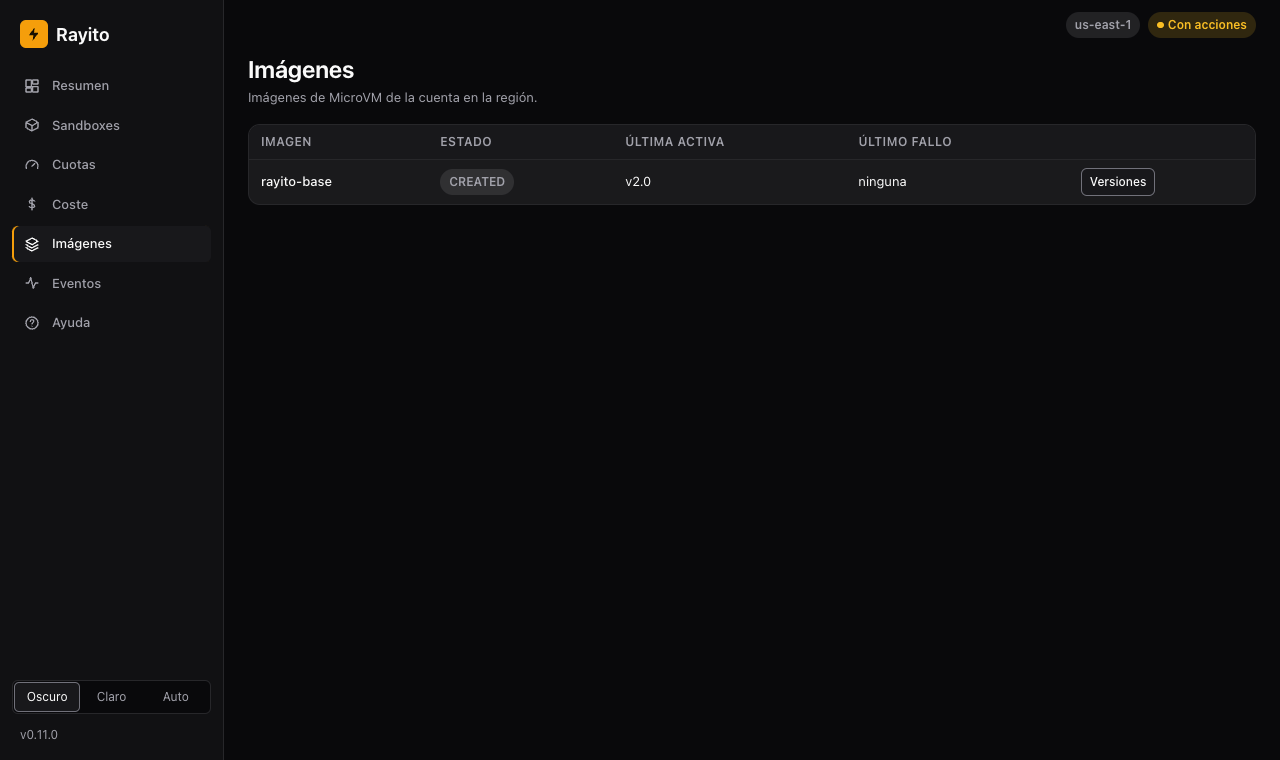
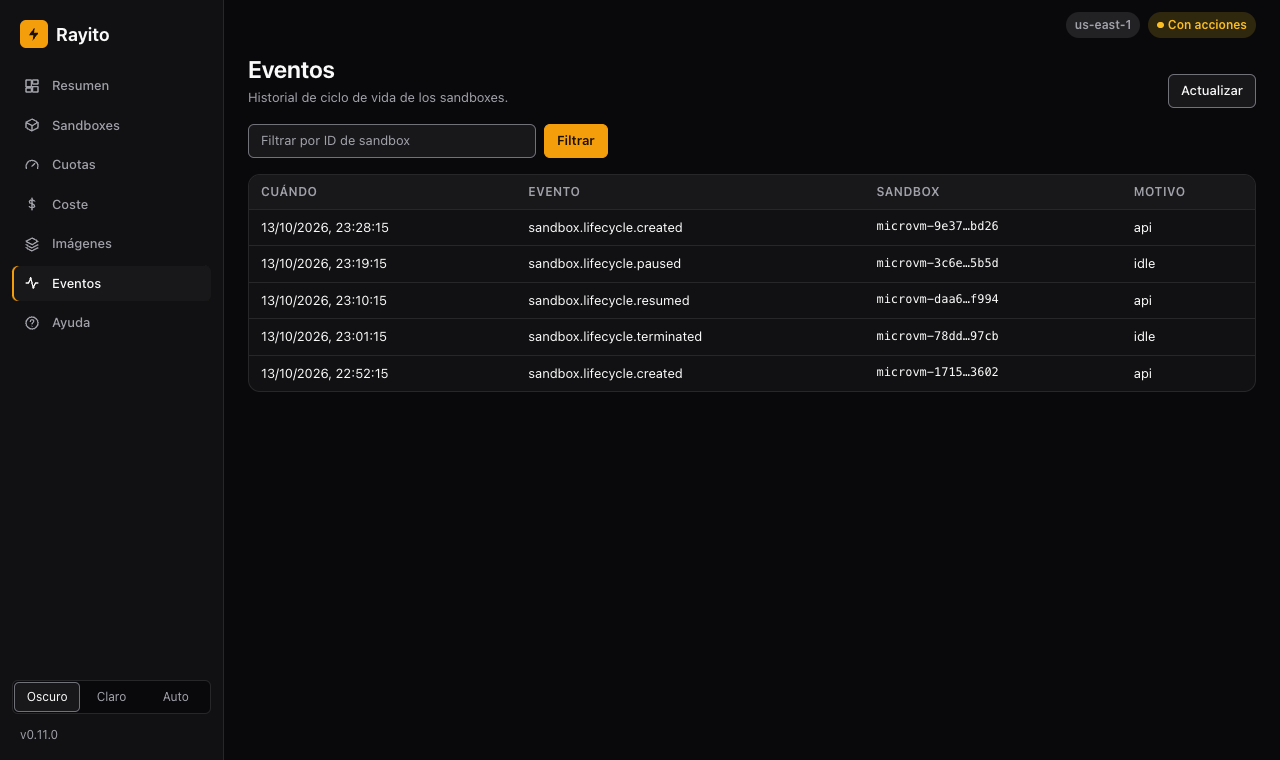
12. Read the Events. The lifecycle history (created, paused,
resumed, killed) of the events-webhooks stack.
13. Change the theme. The selector in the bottom corner toggles between dark, light and automatic.
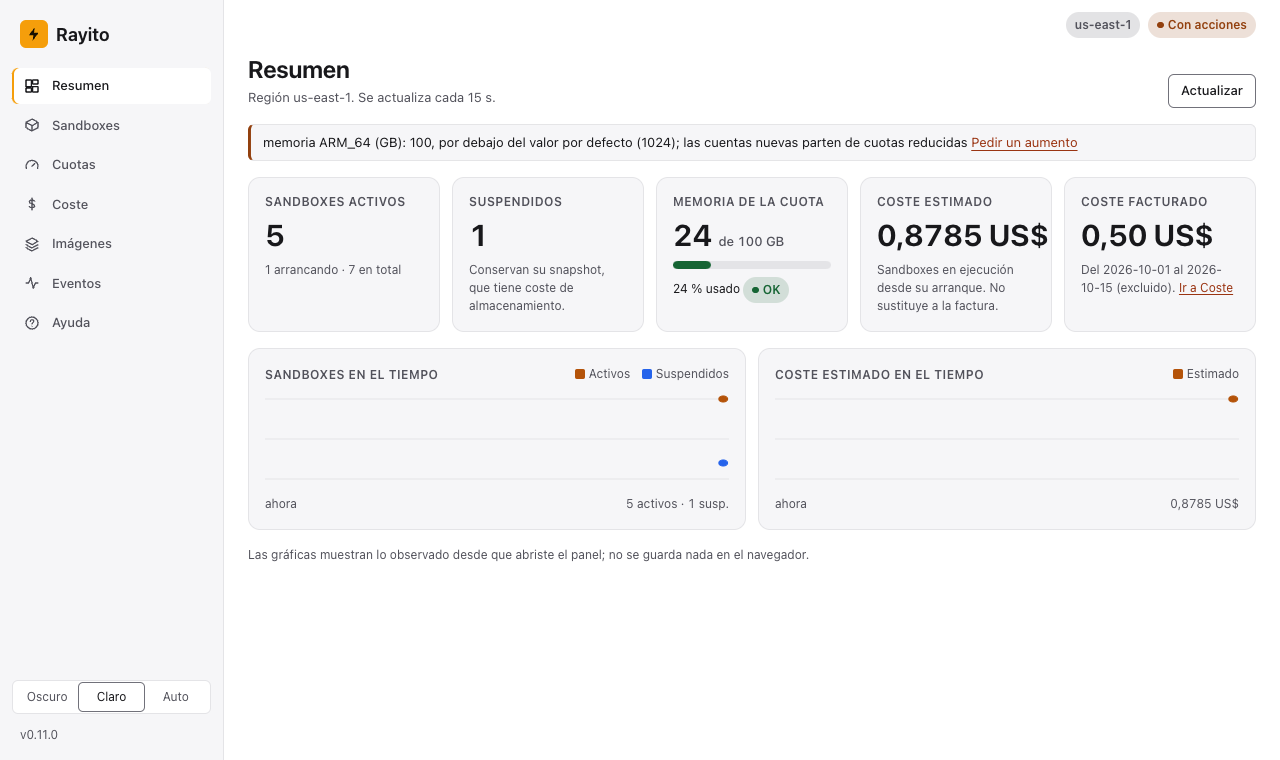
14. Set your own palette and logo. With --theme and --logo
(Customize the theme). The screenshot uses the made-up example
examples/dashboard-theme/ from the repository:
rayito dashboard --theme examples/dashboard-theme/aurora.json \
                 --logo examples/dashboard-theme/aurora-logo.svg
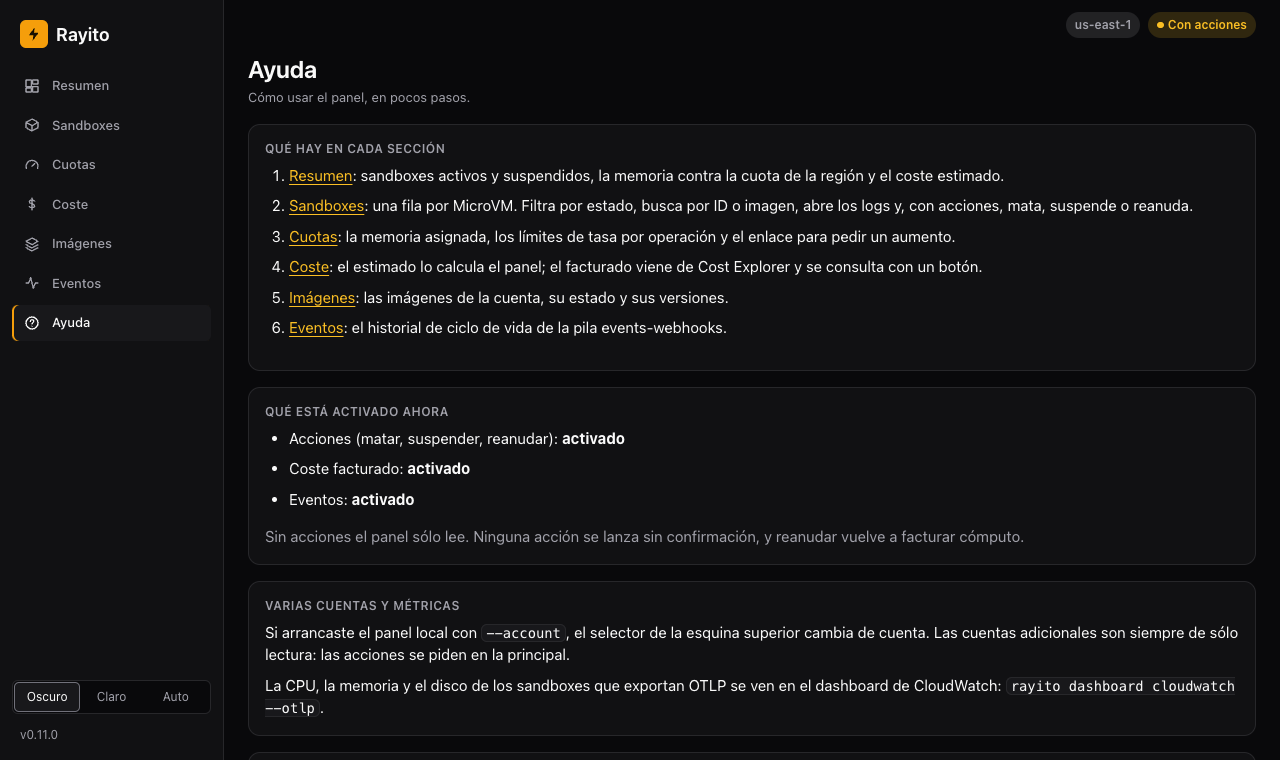
15. Open the Help. The Help ("Ayuda") entry in the sidebar summarizes these steps, says which options are turned on in this session and links to this guide. It is drawn without calling AWS or any external site.
What it shows¶
- Overview (the first page): cards with the active and suspended sandboxes, the memory used against the region's quota (with a bar), the estimated cost and the billed one (on demand), and two charts, sandboxes and estimated cost over time. The charts show what was observed since you opened the dashboard; nothing is stored in the browser.
- Sandboxes: dense table with a fixed header, abbreviated ID with a copy
button, state, memory and time since start, with a state filter and
search by ID or image. Each row's menu (⋯) copies the ID, opens the
logs (if the image has
executionRoleArn) and launches actions; with--allow-actions, the bulk action bar appears only when rows are selected. - Quotas: a bar with the allocated memory against the region's quota (warns at 80 % and is critical at 95 %), the warnings for quotas below the default value and the link to request the increase, and the TPS limits per operation (rate and burst in one row), separated from the capacity quotas.
- Cost: two cards that are not mixed. Estimated is computed by the
dashboard (active time times the documented price, without snapshots or consumption
above the baseline) and never replaces the bill. Billed comes from
Cost Explorer, by usage type, with about 24 h of delay (it warns if some
period is still estimated by AWS) and is only queried with
--cost-explorerand by pressing the button. - Images: the account's images and their versions.
- Events: the lifecycle history of the
events-webhooksstack (with--events-stack).
Actions¶
With --allow-actions, select sandboxes and press Kill, Suspend or
Resume. First of all, the dashboard shows what you are about to do, to how many and
how long it will take, and asks you to confirm. Actions go into a queue that
respects each operation's TPS limit (by default, suspend 2/s,
resume 5/s and kill 10/s, or the applied quota if lower), with a progress
bar. A failure of one sandbox does not stop the others and only its AWS
code is shown, never its message. There is no "extend" action: AWS has
no UpdateMicrovm, and the maximum duration and the inactivity policy
cannot be changed after the sandbox is launched
(AWS_API_NOTES.md).
Customize the theme¶
Every color, radius, font and spacing of the dashboard comes from design tokens
(CSS variables). It ships two built-in themes, rayito-dark (the default) and
rayito-light, and the dashboard's selector chooses between Dark, Light and Auto
(follows the system). To use your own palette, pass a file with the
token values and, if you want, a logo:
rayito dashboard --theme my-theme.json --logo my-logo.svg
# or with environment variables
RAYITO_DASHBOARD_THEME=my-theme.json RAYITO_DASHBOARD_LOGO=my-logo.svg rayito dashboard
The theme is validated before the port is opened; if something does not comply, the command exits with code 2 and a message that names the key (never the value or the path). It is served from the same origin, with the same CSP: there are no remote fonts, images or stylesheets.
JSON format (.json). All keys are optional except version:
{
  "version": 1,
  "name": "aurora",
  "tokens": { "radius": "0.625rem", "font-sans": "\"Avenir Next\", system-ui, sans-serif" },
  "dark":  { "bg": "#110d1c", "primary": "#a78bfa", "on-primary": "#1a0b3b" },
  "light": { "bg": "#faf8fe", "primary": "#6d28d9", "on-primary": "#ffffff" }
}
tokens: values of any token; they apply to both schemes (radii, spacing and fonts go here). A color set here applies to light and dark.darkandlight: colors only, for each scheme; they win overtokens.- Whatever you do not set stays as in the built-in theme.
CSS format (.css): only :root, :root[data-theme="dark"] and
:root[data-theme="light"] blocks with --token: value; declarations (equivalent to
tokens, dark and light). No other selectors, @ rules or
url() are accepted.
What is accepted. The keys are a closed list and an unknown key is rejected. Each value must meet the grammar of its type:
- color:
#rgb,#rgba,#rrggbb,#rrggbbaa, orrgb()/rgba()/hsl()/hsla()with numbers; - length:
0or a number withpx,remorem; - font: up to 8 comma-separated families, with letters, numbers, spaces,
_and-("My Font", system-ui). Fonts installed on the machine: fonts are not downloaded.
The CSS that reaches the browser is generated by the dashboard from the already validated values; the file's text is never copied as is, so a theme cannot inject CSS, scripts or remote resources. Maximum file size: 16384 bytes.
| Token | Type | rayito-dark |
rayito-light |
Where it is used |
|---|---|---|---|---|
bg |
color | #09090b |
#ffffff |
Page background |
surface |
color | #111113 |
#f6f6f8 |
Sidebar, cards and tables |
surface-raised |
color | #18181b |
#ffffff |
Controls, table header, menus and dialogs |
border |
color | #27272a |
#e4e4e7 |
Dividers and soft borders |
border-strong |
color | #71717a |
#71717a |
Control borders (3:1 contrast) |
fg |
color | #fafafa |
#18181b |
Text |
fg-muted |
color | #a1a1aa |
#52525b |
Secondary text |
primary |
color | #f59e0b |
#f59e0b |
Brand accent: primary button, default logo, selection |
on-primary |
color | #1c1100 |
#1c1100 |
Text on primary |
accent |
color | #fbbf24 |
#9a3412 |
Links |
accent-strong |
color | #fcd34d |
#7c2d12 |
Links on hover |
focus |
color | #60a5fa |
#1d4ed8 |
Focus ring |
ok |
color | #4ade80 |
#166534 |
Success state |
warning |
color | #fbbf24 |
#92400e |
Warning |
critical |
color | #f87171 |
#b91c1c |
Critical and destructive actions |
info |
color | #60a5fa |
#1d4ed8 |
Information (suspended, billed) |
chart-1 |
color | #f59e0b |
#b45309 |
Chart series 1 |
chart-2 |
color | #60a5fa |
#2563eb |
Series 2 |
chart-3 |
color | #a78bfa |
#7c3aed |
Series 3 |
radius |
length | 0.375rem |
same | Control radius |
radius-lg |
length | 0.75rem |
same | Card and dialog radius |
space-1 |
length | 0.25rem |
same | Spacing 1 |
space-2 |
length | 0.5rem |
same | Spacing 2 |
space-3 |
length | 0.75rem |
same | Spacing 3 |
space-4 |
length | 1rem |
same | Spacing 4 |
space-6 |
length | 1.5rem |
same | Spacing 6 |
sidebar-width |
length | 14rem |
same | Sidebar width |
font-sans |
font | system | same | Text font |
font-mono |
font | system | same | Monospace font (IDs, code) |
Check the contrast (AA: 4.5:1 for text and 3:1 for control borders and focus) of your palette in both schemes: the dashboard does not fix it.
Logo (--logo): a PNG or an SVG of up to 262144 bytes, served from the
dashboard itself at /theme/logo and, besides, with its own CSP (default-src 'none',
sandbox). It is validated by content, not by extension. An SVG with scripts,
foreignObject, animations, on* handlers, DTDs or entities, or any
href or url() that is not a local fragment (#id), is rejected.
The repository has an example with a made-up palette:
examples/dashboard-theme/ (aurora.json, aurora.css and aurora-logo.svg).
The same theme in the stack
The dashboard deployed in your account (Dashboard in your account)
uses the same format: the theme text (JSON) arrives as a stack parameter
(ThemeJson) or from SSM (ThemeParameterName) and goes through the same
validation functions (parse_theme, parse_logo) before being served at
/theme.css and /theme/logo. The keys and the format do not change.
Security¶
The dashboard uses your credentials, so it defends itself from the web pages you open in
the same browser: loopback Host and Origin (otherwise, 421/403),
single-use startup token, HttpOnly and SameSite=Strict cookie,
CSRF token on every POST and on the billed cost query, Sec-Fetch-Site and CSP without unsafe-inline and nothing logged. Detail
and residual risk in Security.
Minimum IAM¶
Grant only what you use.
{
  "Version": "2012-10-17",
  "Statement": [
    {
      "Sid": "ReadFleet",
      "Effect": "Allow",
      "Action": [
        "servicequotas:ListServiceQuotas",
        "lambda:ListMicrovms",
        "lambda:ListMicrovmImages",
        "lambda:ListMicrovmImageVersions",
        "lambda:GetMicrovmImageVersion"
      ],
      "Resource": "*"
    },
    {
      "Sid": "ReadLogs",
      "Effect": "Allow",
      "Action": [
        "lambda:GetMicrovm",
        "logs:DescribeLogStreams",
        "logs:GetLogEvents"
      ],
      "Resource": "*"
    },
    {
      "Sid": "BilledCost",
      "Effect": "Allow",
      "Action": "ce:GetCostAndUsage",
      "Resource": "*"
    },
    {
      "Sid": "FleetActions",
      "Effect": "Allow",
      "Action": [
        "lambda:TerminateMicrovm",
        "lambda:SuspendMicrovm",
        "lambda:ResumeMicrovm"
      ],
      "Resource": "*"
    }
  ]
}
Errors¶
Errors are translated by AWS code and the message is only carried by it: AWS's message may name resources in your account.
| AWS code | Exception (Python / TypeScript) | What to do |
|---|---|---|
AccessDeniedException |
AuthenticationException / AuthenticationError |
the permission from the previous section that corresponds to the call is missing |
TooManyRequestsException, LimitExceededException, ThrottlingException |
RateLimitException / RateLimitError |
retry later; with Cost Explorer, use the cache instead of refresh=True |
any other (for example DataUnavailableException, if Cost Explorer is not enabled in the account) |
DashboardException / DashboardError, with aws_code/awsCode |
depends on the code |
See also¶
- Optional features and their cost
- Limits: Lambda MicroVMs quotas and TPS
- Pricing: where the compute prices come from
- Dashboard in your account (the
dashboardstack) - Events and webhooks
- Dashboard JSON API
rayito dashboardin the CLI- Python reference: optional and TypeScript reference