Dashboard: CloudWatch dashboard, multiple accounts and quota alerts¶
Three optional extras of the management dashboard (ADR-026,
phase 3). None turns on by itself and none needs a Rayito server: what
they create is yours and is deleted with rayito stack destroy.
The steps for each extra are in its section. Only the multi-account view carries a screenshot: the CloudWatch dashboard and the SNS alerts are seen in the AWS console, which shows your account's data, so here they go as text and sample output. The dashboard's guide with screenshots covers the rest, and the dashboard's Help entry summarizes it.
| Extra | What it is | Where it runs |
|---|---|---|
| CloudWatch dashboard | The JSON of a dashboard with sandbox logs, OTLP metrics and quota usage | It is printed (no AWS) or the dashboard-cloudwatch stack is deployed |
| Multiple accounts | rayito dashboard --account sees other accounts with a read-only role |
Your laptop; the dashboard-read-role stack goes in each target account |
| Quota alerts | A scheduled Lambda publishes to SNS when a quota threshold is crossed | The quota-alerts stack, in your account |
CloudWatch dashboard¶
Cost and activation
- Default: off.
rayito dashboard cloudwatchonly prints text: it needs no credentials and makes no AWS call. Thedashboard-cloudwatchstack is not created until you deploy it. - Turns on:
rayito stack deploy dashboard-cloudwatch, oraws cloudwatch put-dashboardwith the JSON the CLI prints.IncludeOtlp=trueandIncludeQuota=trueadd the optional charts. - Resources and AWS calls: a single
AWS::CloudWatch::Dashboard; no function, role or data. - Approximate cost: generating the JSON is free (
rayito dashboard cloudwatchdoes not call AWS); deploying it costs. $0 as long as you have fewer than 4 dashboards (the first 3, of up to 50 metrics, are free); above those 3, $3 a month per dashboard. Each Logs Insights widget runs its query every time you open or refresh the dashboard and CloudWatch bills the scanned data ($0.005 per GB): bound the time range.--quota(orIncludeQuota=true) charts thequota-alertsstack's metric, which costs ~$0.30 a month separately; the--otlpPromQL queries from the console are not billed (CloudWatch pricing, checked on 2026-10-13, us-east-1). - IAM: whoever deploys, what Optional stacks requires
plus
cloudwatch:PutDashboard,GetDashboardandDeleteDashboards(CloudFormation acts with their permissions); whoever views it,logs:StartQueryandlogs:GetQueryResultson the groups. - How to turn it off:
rayito stack destroy dashboard-cloudwatch, oraws cloudwatch delete-dashboards. - Example: the one in the next section.
The dashboard carries five Logs Insights widgets (plus a header) over the /rayito/* groups
(the one the SDK uses with logging="cloudwatch"): lines per interval, errors
per interval, lines per group, noisiest streams and recent errors. With
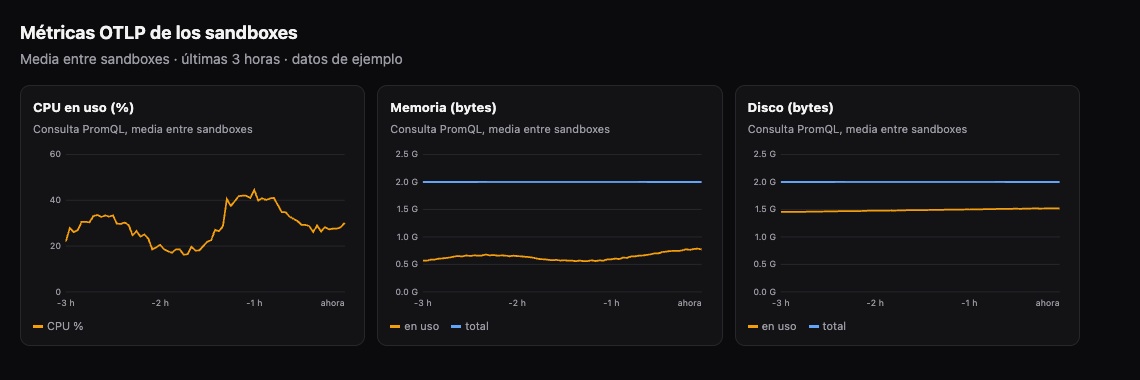
--otlp it adds CPU, memory and disk from rayd's
OTLP metrics; with --quota, the chart of
memory quota usage with the warning and critical thresholds as lines.
# Only prints: no AWS call, not even credentials
rayito --region us-east-1 dashboard cloudwatch > rayito-board.json
rayito dashboard cloudwatch --otlp --quota --output rayito-board.json
# Other log groups, or a prefix of your own
rayito dashboard cloudwatch --log-group /rayito/base --log-group /rayito/agent
rayito dashboard cloudwatch --log-group-prefix /rayito/team-a/
# Creating it is up to you:
aws cloudwatch put-dashboard --dashboard-name "$DASHBOARD_NAME" \
  --dashboard-body file://rayito-board.json
The dashboard name. The stack does not fix a name: with the DashboardName
parameter empty (the default) the dashboard is named like the stack
(rayito-dashboard-cloudwatch unless you use --stack-name), which is already unique
in the region, so deploying does not clash with a dashboard of yours called
rayito. To choose another, pass it as a parameter (--param
DashboardName=<name>). A stack deployed before this change keeps the
name it already had: redeploying does not rename it.
The JSON the CLI prints and the one the stack deploys come from the same
generator, so they cannot diverge (a test checks it). The group
name and the prefix are validated before building any query: only letters,
numbers and _ . # - /.
Try the OTLP charts¶
The --otlp charts (or IncludeOtlp=true) only have data if some
sandbox exports its OTLP metrics, and that export
is off by default. To see the charts with data:
- Deploy the export policy once in the account:
rayito stack deploy otlp-export. It costs nothing at rest. - Create a sandbox with
telemetry=TelemetryExport(...)(TypeScript:telemetry: new TelemetryExport({...})) on therayito-base-capsimage with your execution role, as the OTLP export example shows. Each batch costs about $0.00002 per sandbox-hour atinterval_s=60. - Wait at least two intervals (
interval_s, 60 s by default) and check on the sandbox itself that the sending works:sbx.get_telemetry_status()should giveexportedgreater than zero andlast_error_classempty. - Deploy or update the dashboard with
IncludeOtlp=trueand open it in the CloudWatch console. The three charts (CPU, memory and disk) use PromQL queries with the metric name in quotes, because of the dots:avg({"rayito.sandbox.cpu.used_pct"}). If you export withnames="e2b", the metrics are callede2b.sandbox.*and these charts stay empty. - To turn it off, terminate the sandbox (
sbx.kill()) and, if nobody uses it anymore,rayito stack destroy otlp-export. If you attached theRayitoOtlpExportpolicy to a role, detach it first: CloudFormation does not delete a policy that is still attached (DELETE_FAILED).
OTLP metrics do not appear in ListMetrics, so look for the series in
Metrics → Query in the console with PromQL, not in the classic explorer. This is
how the dashboard's three charts look with sample data (in your account
they will draw whatever your sandboxes export):
To check the data without opening the console, CloudWatch offers a PromQL HTTP
API (https://monitoring.<region>.amazonaws.com/api/v1/query and
query_range, signed with SigV4 for the monitoring service) that accepts the same
query as the widget:
import json
import urllib.parse
import urllib.request

import boto3
from botocore.auth import SigV4Auth
from botocore.awsrequest import AWSRequest

session = boto3.Session(region_name="us-east-1")
query = urllib.parse.urlencode({"query": 'avg({"rayito.sandbox.cpu.used_pct"})'})
url = f"https://monitoring.us-east-1.amazonaws.com/api/v1/query?{query}"
request = AWSRequest(method="GET", url=url)
SigV4Auth(session.get_credentials().get_frozen_credentials(), "monitoring", "us-east-1").add_auth(request)
reply = urllib.request.urlopen(urllib.request.Request(url, headers=dict(request.headers)))
print(json.load(reply)["data"]["result"])
Measured on real AWS
Tested on 2026-10-14 in us-east-1 with Python and TypeScript sandboxes
(interval_s=15): the first batch arrives in seconds and the seven metrics
answer the query with the name in quotes; without quotes, PromQL
gives a syntax error. Each sandbox is a different series
(@resource.sandbox_id). The log widgets' SOURCE logGroups(namePrefix: [...])
runs in Logs Insights and returns results. What could not
be checked through the API is how the console draws the PromQL widgets
(GetMetricWidgetImage does not support them). Detail: AWS_API_NOTES.md §30,
Q167.
Multiple accounts¶
Cost and activation
- Default: off.
rayito dashboardwithout--accountsees only the account of your credentials, and STS is not called. - Turns on:
rayito dashboard --account NAME=ROLE_ARN, repeatable up to 10 accounts, after deployingdashboard-read-rolein each target account. - Resources and AWS calls: in each target account, a read-only
AWS::IAM::Role. In the dashboard, onests:AssumeRoleper account (when requesting its view for the first time and when renewing every hour) and the same reads as the single-account dashboard:ListMicrovms,ListMicrovmImages,Get/ListMicrovmImageVersionandListServiceQuotas. - Approximate cost: $0. IAM and STS do not bill; the reads have no price (IAM, checked on 2026-10-13).
- IAM: the dashboard's identity needs
sts:AssumeRoleon those roles; each target role only allows the five reads above. - How to turn it off: do not pass
--account;rayito stack destroy dashboard-read-rolein each target account deletes the role. - Example: the one in this section.
The multi-account view belongs to the local dashboard (rayito dashboard). The additional
accounts are always read-only: no actions, no billed cost,
no logs and no events. The page's selector only shows the names you
chose; the role's ARN and the account id do not come out through the API.
1. In each target account, deploy the read role. It trusts the
identity that runs the dashboard (never the account root) and, if you want,
requires an ExternalId:
2. In the dashboard's account, give your identity permission to assume those roles and start the dashboard with them:
{
  "Effect": "Allow",
  "Action": "sts:AssumeRole",
  "Resource": "arn:aws:iam::123456789012:role/rayito-dashboard-read-*"
}
rayito dashboard \
  --account staging=arn:aws:iam::123456789012:role/rayito-dashboard-read-AbC123 \
  --external-id a-long-random-value
# Panel de Rayito (us-east-1, sólo lectura, más 1 cuenta de sólo lectura). Ábrelo en tu navegador:
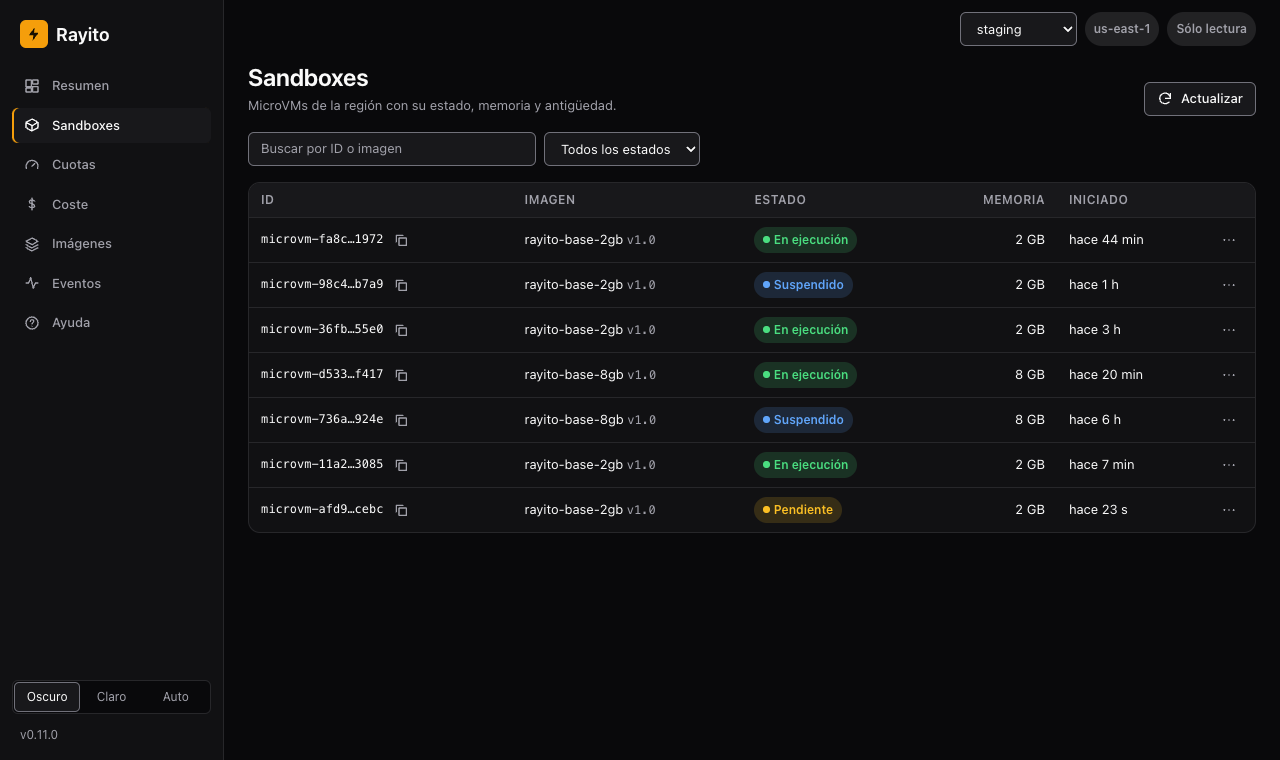
3. Switch accounts. With one or more additional accounts, the top right corner shows a selector with This account and the name of each one. The additional ones are always read-only. The screenshot uses sample accounts.
Without writing accounts in the command. None of this requires ARNs in a file or
in the shell history: the target account can come only from environment
variables and be assembled at run time. --account is also read from
RAYITO_DASHBOARD_ACCOUNTS (NAME=ARN entries separated by spaces) and the
ExternalId, from RAYITO_DASHBOARD_EXTERNAL_ID:
export TARGET_ACCOUNT_ID=<target-account-id>   # you set it, never in the repo
export TARGET_ROLE_NAME=<read-role-name>  # the stack's RoleArn output
export RAYITO_DASHBOARD_ACCOUNTS="staging=arn:aws:iam::${TARGET_ACCOUNT_ID}:role/${TARGET_ROLE_NAME}"
export RAYITO_DASHBOARD_EXTERNAL_ID=<the-same-value-as-the-stack>
rayito dashboard
The template, the dashboard and the identity's policy are account-independent:
only the role's ARN changes, and it arrives at run time. To check a target account end to end: deploy dashboard-read-role
in it (step 1), export the variables, start rayito dashboard and pick the
account in the selector; an account that rejects the role shows up with the code
AccessDenied. If what you want is to check that the role cannot act, do not
test it with a made-up MicroVM id: AWS answers ResourceNotFoundException
before authorizing. Use the IAM simulator (aws iam simulate-principal-policy
on the role) or a real MicroVM.
This is what an account whose role rejects the dashboard looks like (for example, an ExternalId
that does not match): the page shows the AWS code and nothing else.
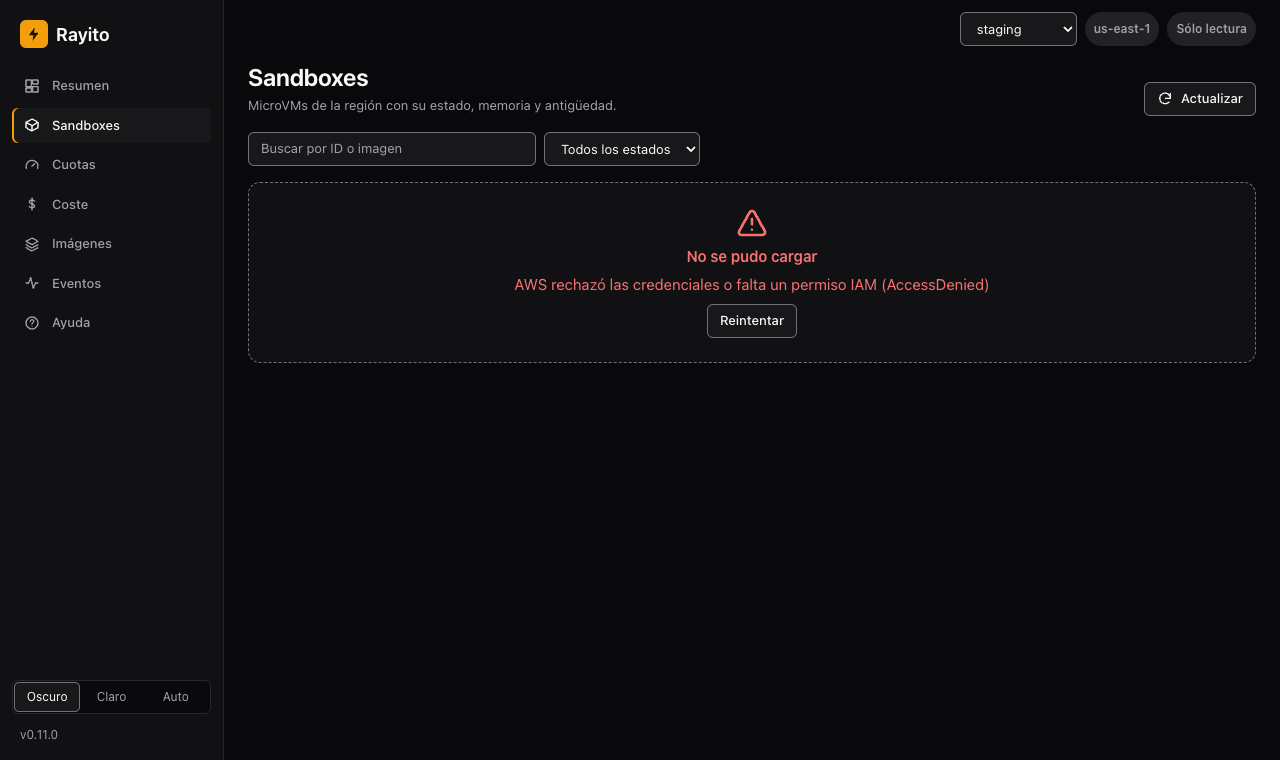
The ExternalId is the same for all accounts. If an account rejects the role, the page says so with the
AWS code (AccessDenied) and without the message, which would name the role and account. The
assumed session lasts 3600 s and renews itself.
The dashboard stack in your account does not include the multi-account view yet: only
the local dashboard has it.
Quota alerts¶
Cost and activation
- Default: off. Nothing is created until you run
rayito stack deploy quota-alerts. - Turns on:
rayito stack deploy quota-alerts --artifact-bucket <bucket>.--param NotificationEmail=...subscribes an email to the topic;--param TopicArn=...uses a topic of yours;WarningPercentandCriticalPercentchange the thresholds andScheduleExpressionthe frequency. - Resources and AWS calls: a Lambda with its log group, an
EventBridge rule, an SNS topic (except with
TopicArn) and its subscription, an on-demand DynamoDB table with one row and an IAM role. Each run lists the MicroVMs and the region's quotas and publishes a custom metric. - Approximate cost: ~$0.30 a month for the custom metric
(
Rayito/Dashboard); Lambda (~720 runs a month withrate(1 hour)), EventBridge, DynamoDB and SNS by email fit in their free tiers (CloudWatch, Lambda, SNS; checked on 2026-10-13, us-east-1). - IAM: whoever deploys needs
CAPABILITY_IAM. The function only reads MicroVMs and quotas; it writes to SNS (sns:Publishon its topic), to its DynamoDB row and to its CloudWatch namespace (cloudwatch:namespace). - How to turn it off:
rayito stack destroy quota-alerts. It deletes everything, including the topic it created (not theTopicArnone). - Example: the one in this section.
The function measures the allocated memory (RUNNING plus suspended) against the region's
quota, like the dashboard's quotas tab, and classifies usage with
the thresholds (0.8 and 0.95 of the quota
by default, as a percentage in the stack). It alerts once per crossing: when the
level goes up (from normal to high, from high to critical) and not on every run
while it holds. It remembers the highest level reached until usage
goes back to normal, so usage that oscillates around the critical threshold alerts
once and not every time it crosses; when it drops to normal, the next crossing alerts
again. If SNS fails, the run fails and the next cycle retries the alert.
The message carries the region, the allocated memory and the quota, and how many sandboxes count; never sandbox ids, image names or account names. If the memory of some sandbox could not be read, it says so: actual usage may be higher.
Each stack watches one region: deploy one per region. The
Rayito/Dashboard/MemoryAllocatedFraction metric (dimension Region) is what
the CloudWatch dashboard draws with --quota. The
SNS topic is not encrypted: the message carries no sensitive data.
Minimum IAM¶
| Who | What it allows | Where |
|---|---|---|
quota-alerts function role |
lambda:ListMicrovms, lambda:GetMicrovmImageVersion (the account's images), servicequotas:ListServiceQuotas, sns:Publish on its topic, dynamodb:GetItem/PutItem on its table, cloudwatch:PutMetricData only with cloudwatch:namespace equal to Rayito/Dashboard |
infra/quota-alerts.yaml |
dashboard-read-role role |
lambda:ListMicrovms, ListMicrovmImages, ListMicrovmImageVersions, GetMicrovmImageVersion, servicequotas:ListServiceQuotas; no writes |
infra/dashboard-read-role.yaml |
Local dashboard identity with --account |
sts:AssumeRole on those roles |
your policy |
None of the three stacks creates CloudFront or buckets, and the alerts one works under a test account's restrictions (the Lambda is created by CloudFormation).